New product concepts and branded campaign production are different jobs
makespots is useful when you want a visible creative idea for a product: a reveal, an environment, a UGC-style execution, or a still-image concept. Select the format, read the inputs, and adapt the workflow with your product references. The focus is deciding what the ad does visually and making the next version of that direction.
AdCreative.ai is worth considering when the process revolves around branded campaign creative, reusable layouts, multiple brands, or creative analysis. Its current public product includes image and video creation as well as scoring and related tools. It would be inaccurate to compare it only as a static-banner generator.
A team may need both a new concept and a system for producing approved brand variations. Identify which job is missing. If the visual direction is weak, more sizes of the same idea will not necessarily resolve it. If the direction already works, a repeatable layout and review process may be the more useful next investment.
 Choose makespots for
Discover a product-ad execution and adapt its workflow with the assets behind your brand.
 Consider AdCreative.ai for
Generate campaign creative around brands, layouts, product imagery, and creative analysis tools.
Official sources:AdCreative.ai platformAdCreative.ai Custom TemplatesAdCreative.ai Creative Scoring
See where makespots and AdCreative.ai begin
makespots presents creative examples first. The library is a place to choose a visual treatment and inspect the workflow behind it. That is useful when your team has product assets but has not agreed on the execution for the next ad.
AdCreative.ai’s public homepage presents banners, photoshoots, video, and analysis in a broader campaign-creative offering. The capture below is its actual landing page. It makes the positioning visible, while the comparison separates brand-layout production from format discovery and separates predictive scores from observed advertising results.
Template library · real product interface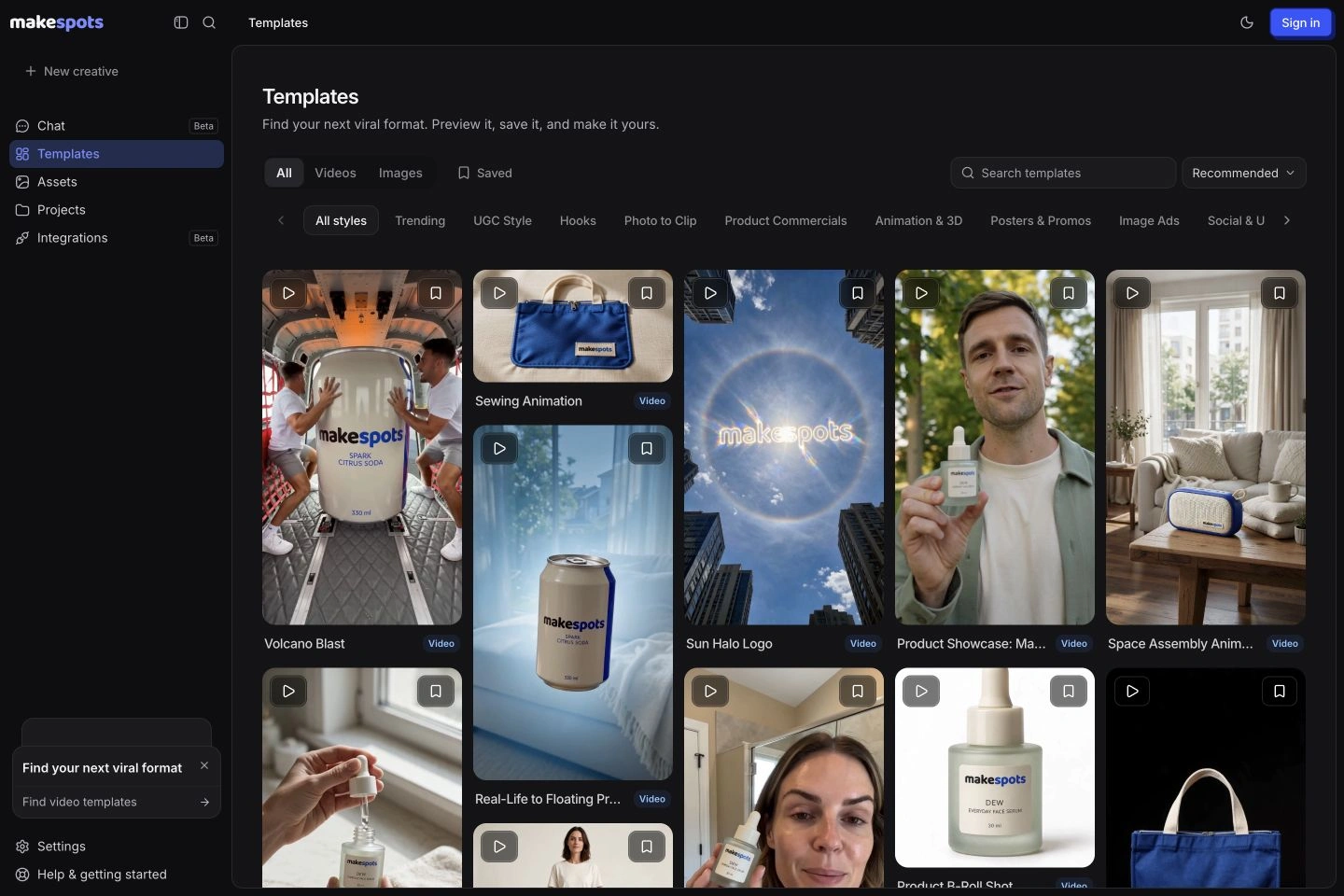 Official public product page

Competitor capture reviewed November 10, 2026. Open a screenshot to inspect it at full size. Public-page visuals illustrate the advertised workflow; they are distinct from a generated-output benchmark.
makespots vs. AdCreative.ai by creative-production need
Compare concept selection, brand layouts, product visuals, analysis, and account allowances separately. Both products can contribute to advertising creative, but that does not establish equal controls, an equivalent scoring model, or interchangeable credit units. The distinctions below help define a useful evaluation brief.
| What matters | | |
|---|---|---|
| Starting point | A visible product-ad format and its editable workflow. | A brand, campaign creative request, layout, or product-production tool. |
| Creative formats | Published video and image templates, including product reveals. | Ad layouts, product imagery, video, and related creative tools. |
| Brand layouts | Reusable assets and template-specific creative controls. | A dedicated custom-template workflow and plan-specific brand allowances. |
| Creative scoring | No equivalent predictive-scoring system is established here. | A dedicated Creative Scoring and visual-analysis presentation. |
| Variation process | Duplicate a project and change a defined creative input. | Brand and custom-template-based variations; verify the selected feature and plan. |
| Credit definition | Generation operations use a project-specific quote. | The public ad-creative FAQ describes download-based credits; check feature-specific terms. |
| Multi-brand use | Evaluate the current workspace against agency requirements. | Brand allowances and user limits are part of the pricing matrix. |
| Best evaluation | A fresh visual product concept and one revision. | A brand-consistent production task plus any analysis requirement. |
Official sources:AdCreative.ai platformAdCreative.ai Custom TemplatesAdCreative.ai Creative Scoring
A creative mechanism is different from a branded frame
A product reveal describes a creative mechanism: the object enters the scene in a particular way. A branded layout describes the placement of elements such as the image, headline, logo, and action. Both matter, but they solve different production questions. An ad can have a consistent layout and still need a more compelling visual idea.
In makespots, compare the previews to decide how the product should appear, then adapt the corresponding instructions and references. In AdCreative.ai, inspect the custom-template route when a repeatable branded composition is the requirement. Test whether the system preserves the parts your team has already approved when the copy or product image changes.
For a seasonal campaign, first establish which element is changing: the visual concept, the offer, the product, or the placement. Then choose the workflow around that change. This avoids repeatedly redesigning approved brand details when you only need a new message, or repeatedly resizing an idea when the creative concept itself needs work.
Official sources:AdCreative.ai Custom Templates
Review the object as carefully as the composition
makespots publishes both image and video templates. A still-image concept can help you choose an environment or product presentation; a short video can explore the entrance, transformation, or interaction. Read each template’s input requirements because a logo animation, a product photo, and a presenter scene do not necessarily use the same references.
AdCreative.ai also presents product imagery and video tools. If that is the requirement you are comparing, use the specific creation route rather than assuming its scoring or layout functionality tells you how a product shot will behave. A strong campaign-management proposition and a suitable generated product scene are separate things to evaluate.
Choose a product with recognizable packaging, a clear silhouette, and a distinctive color. Inspect the reference and output side by side. Check small text, scale, shadows, and the object’s shape through motion. If exact wording must stay unchanged, plan an approved source graphic or end card rather than relying on a generated label to reproduce it perfectly.
Official sources:AdCreative.ai platform
Use a predicted score as a review input, not a campaign result
AdCreative.ai’s Creative Scoring presentation describes uploading creative, analyzing elements, and receiving scores or improvement suggestions. That can give a team another way to prioritize review. It is a different product capability from choosing a template or inspecting a generation workflow.
This comparison does not establish a makespots equivalent to that scoring system. In makespots, you can review the chosen format, product references, workflow, and final output. Use an explicit review checklist for product fidelity, message accuracy, visual clarity, and the intended next action.
Keep a boundary between a model’s assessment and your actual advertising evidence. A high score does not tell you what your acquisition cost will be in a particular market, audience, placement, or offer. If scoring helps select candidates, test approved versions under a documented campaign process and compare the observed results there.
Official sources:AdCreative.ai Creative Scoring
Price and organize the brands you actually manage
A multi-brand production process needs more than a place to store a logo. A reviewer must know which product, claim, offer, font, and final asset belong to each client or campaign. In AdCreative.ai, inspect the plan’s brand allowance and the custom-template process against those organizational requirements.
makespots provides reusable assets and saved projects. Keep product references named by product and version, duplicate an approved project for the next creative, and state the variable being changed. This is a useful creative-production process, but it should not be treated as proof of an equivalent agency brand-management or user-permission system.
For an agency evaluating a tool, list active brands separately from occasional collaborators and output volume. A plan may have sufficient credits while the brand or user allowance is the actual constraint. Use a representative client brief and review process, not only a single attractive generated asset, to decide whether the offer fits.
Official sources:AdCreative.ai pricingAdCreative.ai Custom Templates
A download credit and a generation credit are not the same unit
AdCreative.ai’s public FAQ defines its ad-creative credits around downloading generated creative, and distinguishes that from its unlimited-generation language. makespots charges for generation operations according to the workflow quote. Comparing the raw numbers in the two credit columns would therefore be misleading even before considering video or other feature-specific terms.
The public pricing section contains monthly, quarterly, and yearly offers with different credit and brand selections. The table below records the monthly entry displays for the named tiers and identifies the associated allowance. Promotional totals or monthly equivalents under longer commitments should be read with their billing label, not treated as a normal month-to-month price.
For a budget, describe the complete job: how many brands, how many distinct concepts, how many approved downloads or exports, and which video or analysis features the team needs. Confirm what each selected plan includes. A subscription comparison becomes useful when it reflects those requirements rather than assuming every output is a static image or every credit buys a full ad.
| AdCreative.ai tier | Monthly entry display (USD) | Entry allowance to verify |
|---|---|---|
| Starter | $39 | 20 credits; 1 brand |
| Professional | $249 | 300 credits; 10 brands |
| Ultimate | $999 | 300 credits; 25 brands |
| Enterprise | Custom | Custom agreement |
Monthly entry displays from the official public pricing section. The page also presents promotional, quarterly, yearly, and larger credit selections. Confirm the exact checkout and feature-specific credit rules; ad-creative download credits are not equivalent to makespots generation credits.
| Plan | Monthly price | Credits / month | Parallel generations |
|---|---|---|---|
| Starter | $29 | 800 | 1 |
| Pro | $59 | 2,400 | 2 |
| Scale | $119 | 5,600 | 3 |
274 credits for an illustrative 15-second draft
- Three 5-second Standard video clips
- 3 × 80
- Three large generated images
- 3 × 10
- Short script + short voiceover
- 2 + 2
- Illustrative draft total
- 274 credits
Standard video here means Seedance 2.0 at 720p without video references. Other models, text lengths, references, processing steps, and revisions can change the quote. This is a defined makespots example, not an equivalent-output cost benchmark against AdCreative.ai.
The trial provides 160 credits for 7 days, less than this full example. Review the workspace quote and choose a smaller first test if needed.
Official sources:AdCreative.ai pricing
Use a product launch and a brand-variation task
For the first task, bring a product image, an approved statement, and one intended action. In makespots, choose a visual concept and adapt it. In AdCreative.ai, use the product or ad-creative workflow you would genuinely select for the brief. Review the product’s accuracy and the clarity of the composition before considering any score.
For the second task, preserve an approved brand composition while changing the product or message. Check logo legibility, spacing, contrast, product version, and whether the resulting output fits the intended placement. This task tests repeatability and brand handling rather than just the ability to produce a first concept.
Record the full work needed for approval: candidate generations, downloaded versions, manual corrections, and review time. If you use a scoring feature, record the score separately from the reviewer’s decision. That makes it possible to understand whether the tool improved concept discovery, repeatable production, or prioritization instead of merging all three into an unsupported performance claim.
Launch the approved serum bottle with one visually distinctive product concept, then create a second approved version using a different headline. Preserve the brand logo’s proportions and clear space, the product version, and the exact offer. Evaluate the concept, brand consistency, export requirements, and any scoring feedback separately.
Choose makespots for the concept; evaluate AdCreative.ai for the campaign system
Try makespots if your immediate need is to find and adapt a new visual product-ad format. The previews establish a concrete direction, the input guides explain asset preparation, and the workflow lets you review the creative steps. This can be useful when the team needs another idea, not another copy of the same layout.
Consider staying with AdCreative.ai if your current process relies on custom layouts, multiple brand spaces, its analysis tools, scoring, or account integrations. Verify those dependencies and their plan availability. A product-ad workflow is a useful alternative for a defined job without being a verified replacement for every element of a campaign-production suite.
A broader creative process can combine tools deliberately. Use the product reference and approved concept consistently, preserve the original assets, and assign a clear final review. The team should know where the editable work lives and which output is approved before anything moves into a campaign.
Bring the brand brief and source assets, not just a final banner
There is no documented direct AdCreative.ai project or custom-template importer in makespots. Keep original logos, product images, approved copy, brand specifications, and final exports. Review the reuse rights for any stock material or third-party asset included in the original work.
Recreate one product concept and one brand-consistent revision before moving a larger process. Identify what still depends on the old environment: custom layout behavior, analysis history, scoring, connected accounts, brand allowances, or team access. Those dependencies need their own evaluation rather than being assumed to transfer with the images.
Keep a simple approval record with the product version, copy, offer, source assets, and final file. That makes future edits easier regardless of the tool. Review current renewal and export terms in the account before changing the subscription, especially where the displayed offer uses quarterly or annual billing.
- Preserve original logos, product references, copy, and approved exports.
- Record brand, layout, analysis, integration, and team dependencies.
- Rebuild one product concept and one brand-consistent revision.
- Confirm billing period and the credit definition of each selected feature.
Before you choose a AdCreative.ai alternative
What is a good AdCreative.ai alternative for product concepts?
makespots is worth trying when you want to choose a visual product-ad format and adapt its workflow. Compare brand-layout, multi-brand, analysis, and scoring requirements separately if those are essential to your current process.
Does AdCreative.ai only make static banners?
No. Its current public product includes image and video production alongside branded creative and analysis tools. This comparison does not treat video or product imagery as exclusive to makespots.
Does makespots provide the same predictive creative scoring?
An equivalent predictive-scoring system is not established here. makespots supports template discovery and editable creative workflows. Use explicit review criteria and actual campaign tests to evaluate approved outputs.
Are AdCreative.ai credits comparable with makespots credits?
No. The public AdCreative.ai FAQ describes ad-creative credits as being used when downloading generated creative, while makespots quotes generation operations. Check the terms for the exact feature and plan you intend to use.
Can I import AdCreative.ai templates and brands directly?
There is no documented direct importer. Preserve original logos, product assets, brand specifications, approved copy, and final exports, then recreate a representative brief using the selected makespots workflow.
Does a higher creative score mean the ad will perform better?
A predicted score is a review input, not observed performance in your advertising account. Test approved creatives with your own audience, offer, placement, and objectives to assess actual results.
What this comparison is based on
Official product pages, documentation, and selected public billing states were reviewed on . makespots descriptions reflect the implemented product and published collection. Each image caption distinguishes a public competitor page from our own product interface.
The worked briefs and choice recommendations are original editorial analysis. We have not run a controlled cross-platform generation or advertising-performance benchmark. Screenshots document product presentation, while pricing snapshots need to be checked against the current account offer.
- AdCreative.ai platformAd creative generation and creative scoring tools.
- AdCreative.ai pricingPlan tiers, credit and brand allowances, and billing periods.
- AdCreative.ai Creative ScoringScoring workflow, visual analysis, and improvement suggestions.
- AdCreative.ai Custom TemplatesBrand layouts and repeatable creative production.
Brand names and logos belong to their respective owners and are used to identify the products compared. Publication by makespots does not imply affiliation or endorsement.