A focused format library or a wider production toolkit?
makespots is worth trying when your team needs to decide what the ad should look like before producing it. Browse a product reveal, a UGC-style scene, a visual transformation, or an image concept; inspect the required inputs; and adapt the selected workflow. The starting point is a concrete creative example rather than a long list of tools to assemble into an idea.
MakeUGC now positions itself as a wider AI video-ad studio. Its public offering includes talking actors, product-in-hand creative, motion tools, image ads, workflows, and batches. It also provides a content library. A comparison that says makespots has templates while MakeUGC only has avatars would miss a substantial part of the current product.
The practical choice depends on the production job. For a small brand finding its next visual angle, evaluate the route from preview to product-specific draft. For a team already running a repeatable actor or product-interaction process, evaluate whether changing tools preserves that process and its required capacity.
 Choose makespots for
Explore a focused public collection and open the workflow behind the format you want.
 Consider MakeUGC for
Produce across talking actors, product interactions, model tools, workflows, and batch variations.
Official sources:MakeUGC platformMakeUGC Product in HandMakeUGC AI Workflows
See where makespots and MakeUGC begin
The makespots library puts a range of ad executions together with their visual examples. The useful next step is opening an individual format to inspect its input guide and editable workflow. This gives the person preparing the assets a specific reference for what the team intends to make.
MakeUGC’s homepage shows UGC, product, cinematic, and image creative together. Its breadth is visible in the public capture below. Use that evidence to select a relevant production path for your own test, then inspect the controls and plan allowances behind the particular format you choose.
Template library · real product interface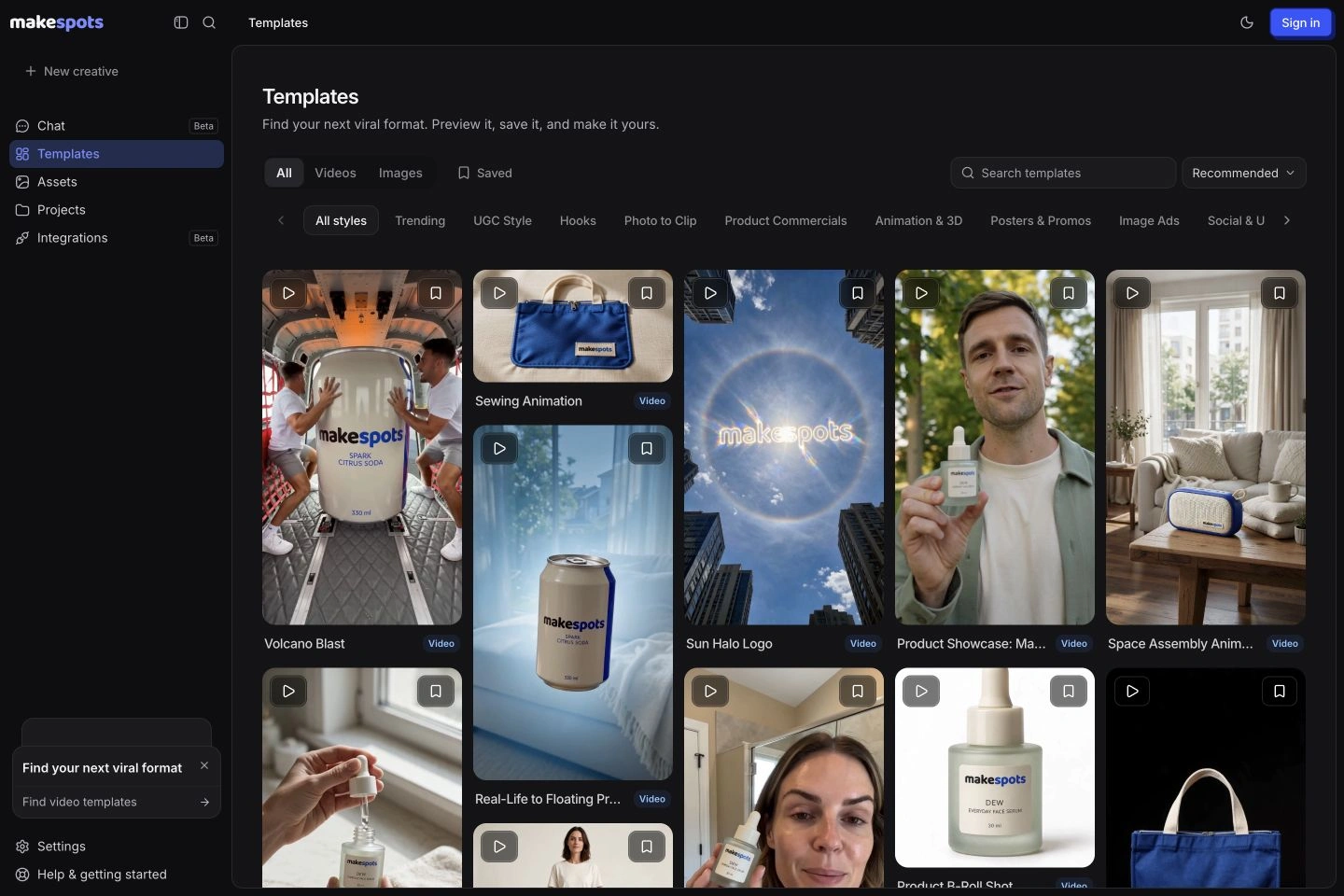 Official public product page

Competitor capture reviewed November 10, 2026. Open a screenshot to inspect it at full size. Public-page visuals illustrate the advertised workflow; they are distinct from a generated-output benchmark.
makespots vs. MakeUGC by production task
There is real overlap: both products present multiple ad formats and editable workflows. The meaningful comparison is how you discover an appropriate concept, prepare the right assets, generate the useful parts, and repeat the process. Treat actor creation, batch production, and API integration as separate requirements rather than assuming one image or video feature establishes all three.
| What matters | | |
|---|---|---|
| Starting point | Preview a format, inspect the inputs, and adapt the workflow. | A script, actor, product interaction, style, or workflow path. |
| Public template collection | 20 curated video and image formats with guides. | AdFlow allowances vary by plan; Starter lists 200+ and Growth 500+. |
| Product interactions | UGC-style and hands-led formats with template-specific inputs. | A dedicated Product in Hand feature, plus motion and gesture tools. |
| Editable workflows | Visible steps in the selected template project. | Node-based AI Workflows and description-led workflow creation. |
| Variation process | Duplicate a project and change a defined variable. | Batch Mode and plan-specific parallel generation allowances. |
| Image and video | Both are present in the published library. | Both are included in its public creation toolkit. |
| API access | Do not assume a verified equivalent production API from this page. | API and MCP access are listed across the public plans. |
| Evaluation priority | Fit of the format and clarity of the editable route. | Fit of the interaction, batch capacity, and plan requirements. |
Official sources:MakeUGC platformMakeUGC pricingMakeUGC AI Workflows
Choose for relevance before catalog size
makespots’ launch library contains 20 public templates, with previews and detailed guides. The limited size is a real tradeoff. It can make the initial exploration manageable, but the right creative still needs to exist in that collection. Open the live library and judge the directions you can actually use rather than assuming a smaller catalog is automatically better.
MakeUGC’s pricing page lists plan-dependent AdFlow and actor allowances, alongside its content library and style formats. If you need a broad range of styles, that breadth may be valuable. Evaluate whether it brings you to a usable idea quickly and whether the required controls are available in the plan you intend to buy.
A useful discovery exercise is to give a teammate one product photo and ask them to identify three viable formats. Record which examples were relevant, what assets each needed, and which formats were ruled out. This tests the quality of the route to a decision. Counting every item in a library does not tell you whether the right concept for your product is easy to find.
Official sources:MakeUGC pricing
Product-in-hand creative needs more than the right face
MakeUGC’s Product in Hand is a specific workflow to evaluate when a performer needs to hold or present your item. That is different from adding a product cutaway after a spoken opening. The reference must support the intended pose, scale, and packaging, and the result needs to make physical sense when the person moves.
makespots offers UGC-style and hands-led formats as part of its template collection. Read each format’s inputs rather than assuming every UGC scene provides the same interactions. Some jobs are better served by a product-focused reveal or a simple hands-only demonstration than by fitting the object into a talking performer’s scene.
For skincare packaging, review the front label, cap, hand size, finger placement, and whether the object remains the same through the shot. A bottle that changes shape halfway through an otherwise appealing clip can make the product demonstration unusable. Review at normal speed and at representative frames before approving the piece.
Official sources:MakeUGC Product in Hand
Inspect the editable steps in both products
makespots opens a selected template into an editable workflow. Keep the product references with the project, review the instructions for the relevant steps, and duplicate the project before making a new creative direction. That lets a team preserve the starting idea and make the reason for a revision easier to explain.
MakeUGC also describes node-based AI Workflows, including an ad description as a route into building a workflow. Its pricing page includes API and MCP access. If automation is a requirement, compare the supported operations, usage limits, and integration behavior directly rather than treating a visible node canvas as proof that the same automated production system exists in both tools.
Use one revision to expose the operational difference: replace the environment while keeping the product and message. Check which steps need to run again, whether the same approved reference remains attached, and whether the team can locate the earlier version. This is a more useful evaluation than only generating a completely new clip each time.
Official sources:MakeUGC AI WorkflowsMakeUGC pricing
A batch is useful when its differences are intentional
MakeUGC’s public feature set includes Batch Mode, and its plan table distinguishes parallel-generation allowances. Those features matter when a team has a defined matrix to produce: several hooks, more than one performer, or a set of approved variations for a campaign. Capacity is useful once the variations have a clear purpose.
In makespots, preserve a useful baseline project and duplicate it for the next version. Name the variable you are changing: opening, setting, product angle, dialogue, or final action. This is a project-based route to a creative test, rather than an assertion that the workspace provides an equivalent one-click batch operation.
Suppose you need two hooks across three visual directions. That is six candidate creatives, not six unrelated attempts to make something appealing. Record the input asset, changed variable, quoted cost, and approval status for each. A batch that mixes untracked product versions or unapproved claims can create more review work than it saves.
Product: the approved serum bottle. Visual directions: quiet studio, hands-led introduction, and a distinctive reveal. Hooks: ingredient-led and routine-led. Keep the product version, offer, and ending consistent. Label each result by direction and hook before review.
Official sources:MakeUGC pricing
Separate the $1 entry offer from the recurring plan
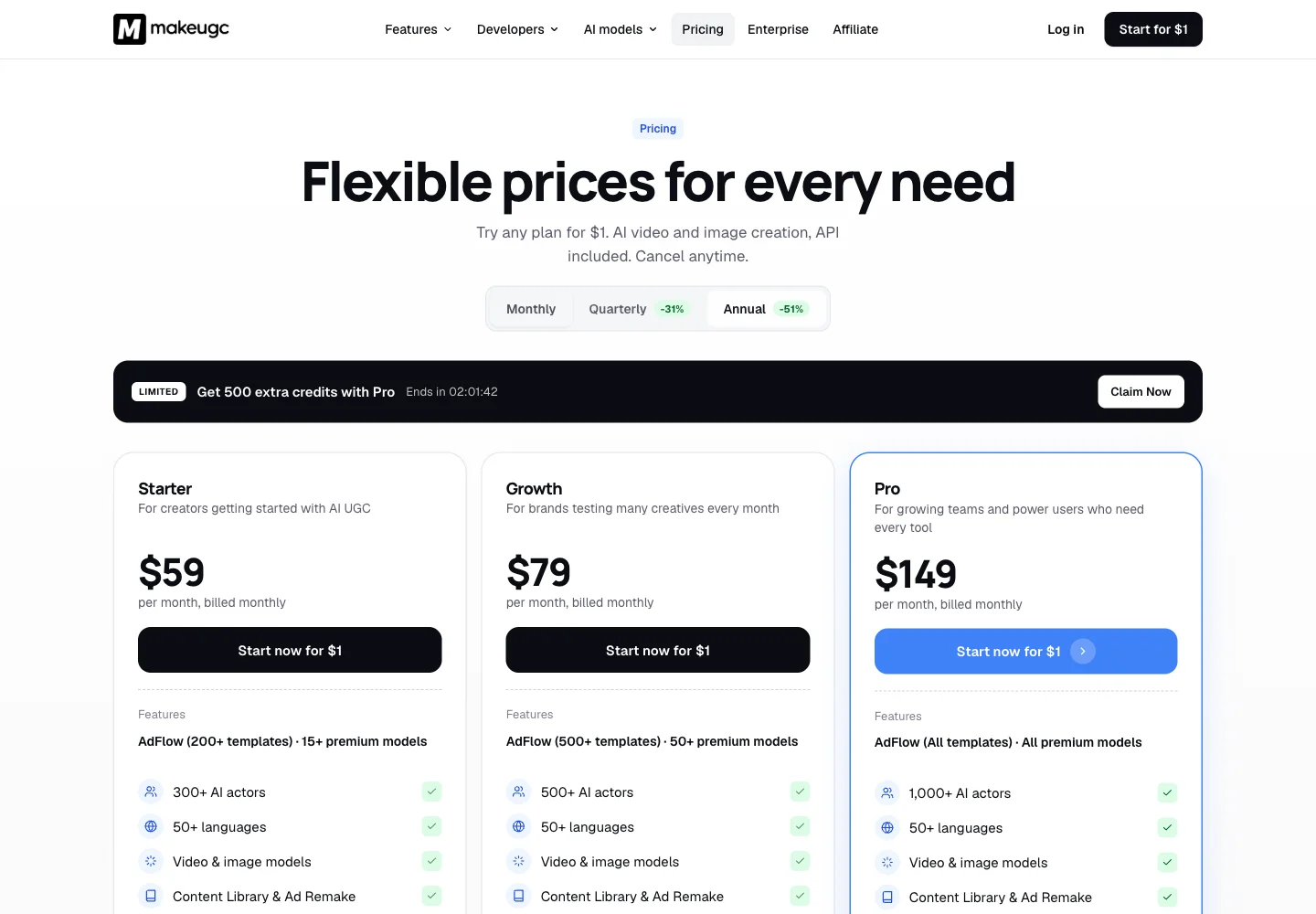
MakeUGC’s public pricing interface opens with discounted annual equivalents. We selected monthly billing to record the table below: Starter $59, Growth $79, and Pro $149 per month. The lower annual display and the introductory $1 offer have different terms from a monthly subscription. Read the selected checkout’s trial duration and renewal amount before paying.
The plan table lists 500 monthly credits on Starter, 1,000 on Growth, and a 2,000–5,000 range on Pro. It also distinguishes output quality, parallel jobs, actor access, custom avatars, and team features. Do not infer that the full Pro range is included at the lowest displayed price; inspect the actual selected credit bundle and quote.
To estimate production spend, write down the generation operations in your batch and collect their actual quotes. Product interactions, model-based shots, speech, and revisions need to be considered as the workflow defines them. A larger number of credits in one product does not establish lower cost than a smaller number in another product because the charging units are different.
| MakeUGC plan | USD / month | Published monthly credits |
|---|---|---|
| Starter | $59 | 500 |
| Growth | $79 | 1,000 |
| Pro | $149 entry display | 2,000–5,000; confirm selection |
| Enterprise | Custom | Custom |
Monthly billing was selected. The $1 trial has its own duration and renewal terms. The Pro page presents a credit range, so confirm the selected package rather than assuming the maximum allowance at the entry price.
| Plan | Monthly price | Credits / month | Parallel generations |
|---|---|---|---|
| Starter | $29 | 800 | 1 |
| Pro | $59 | 2,400 | 2 |
| Scale | $119 | 5,600 | 3 |
274 credits for an illustrative 15-second draft
- Three 5-second Standard video clips
- 3 × 80
- Three large generated images
- 3 × 10
- Short script + short voiceover
- 2 + 2
- Illustrative draft total
- 274 credits
Standard video here means Seedance 2.0 at 720p without video references. Other models, text lengths, references, processing steps, and revisions can change the quote. This is a defined makespots example, not an equivalent-output cost benchmark against MakeUGC.
The trial provides 160 credits for 7 days, less than this full example. Review the workspace quote and choose a smaller first test if needed.
Official sources:MakeUGC pricing
Compare one approved serum concept and its next version
Start with an original front image of the serum bottle and the exact product facts approved for advertising. In makespots, choose a relevant preview and supply its required references. In MakeUGC, use the creation path that reflects the requirement you are comparing, such as a product-in-hand performance or another suitable visual format.
Judge the first draft for a clear opening, a stable product, a plausible action, and an understandable next step. If the script contains an ingredient claim, check that the spoken words match the approved statement. The creative tool does not establish whether a claim is substantiated, and a generated performer should not be presented as a real customer giving a verified testimonial.
Then change only the opening. Keep the rest of the brief available, compare the new output with the approved baseline, and record the time and credits needed to get to an acceptable version. If you later compare the ads in a campaign, hold the testing conditions deliberately so the result can be interpreted.
Match the tool to the production process you want to repeat
Try makespots when you want a focused library of visible product-ad formats and an editable route behind each one. This can fit a founder or small brand whose immediate challenge is selecting a visual idea and preparing the correct references. The public previews and guides help establish that direction before you spend credits.
Consider staying with MakeUGC if your process depends on its product-in-hand controls, wider style library, batch capacity, custom actors, or API access. These are concrete dependencies to inspect, not features a general alternative automatically replaces. If the existing process already produces usable work, test a new creative job first.
A mixed setup can make sense when the jobs differ. Keep source images, approved scripts, and output names consistent across tools. Your team should know which system owns the editable project and where to find the final approved asset, even if more than one service helped produce the creative.
Move the brief, references, and approval process first
There is no documented direct MakeUGC project importer in makespots. Bring the source materials you have permission to reuse: product references, approved text, brand assets, and final exports. Treat custom actors and cloned voices as separate rights and portability questions rather than ordinary files you can assume will transfer.
Rebuild one recurring job, obtain approval, and make a meaningful variation. Then identify the remaining gaps: automated calls, actor consistency, batch size, export quality, or team review. Cover those requirements before replacing the whole production process or changing a recurring subscription.
Save the original assets separately from final exports. If the next product launch uses different packaging, you will need to update the references and claims rather than simply duplicate an old final video. A tidy migration preserves the logic of the brief as well as the finished files.
- Export reusable originals and approved final assets.
- Document actor, product-interaction, batch, and API dependencies.
- Recreate one recurring brief and one controlled revision.
- Confirm plan allowances and renewal terms in the account before expanding.
Before you choose a MakeUGC alternative
What is a good MakeUGC alternative for product ads?
Try makespots when you want to choose a visible product-ad format and adapt its workflow with your assets. Compare the specific UGC, product-interaction, or automation requirements separately if they are essential to your current MakeUGC process.
Does MakeUGC only make talking-head videos?
No. Its current public product includes product videos, cinematic and style formats, image ads, workflows, and batch tools alongside talking actors. Both products should be evaluated for the actual format you need.
Is the MakeUGC $1 offer its monthly price?
No. It is an introductory offer with checkout-specific trial and renewal terms. With monthly billing selected during research, the public entry prices were $59 for Starter, $79 for Growth, and $149 for Pro. Confirm the current selection before purchasing.
Does makespots replace MakeUGC Batch Mode?
makespots provides projects and duplication for controlled variations. This page does not claim an equivalent one-click batch-production feature. Test the size and structure of the batch you actually need.
Can I move my MakeUGC actor or project directly?
There is no documented direct project or actor importer. Reuse only materials you have the rights to use, then recreate a representative brief with the controls supported by the selected makespots template.
What do the screenshots and pricing tables establish?
They document official public product pages and selected billing states on the review date. They do not establish identical generation quality, equal credit value, or improved ad performance after switching.
What this comparison is based on
Official product pages, documentation, and selected public billing states were reviewed on . makespots descriptions reflect the implemented product and published collection. Each image caption distinguishes a public competitor page from our own product interface.
The worked briefs and choice recommendations are original editorial analysis. We have not run a controlled cross-platform generation or advertising-performance benchmark. Screenshots document product presentation, while pricing snapshots need to be checked against the current account offer.
- MakeUGC platformCurrent product positioning, creation formats, and workflows.
- MakeUGC pricingMonthly versus annual billing, plan credits, and API allowances.
- MakeUGC AI WorkflowsNode-based workflow creation and automation.
- MakeUGC Product in HandProduct-reference and actor interaction workflow.
Brand names and logos belong to their respective owners and are used to identify the products compared. Publication by makespots does not imply affiliation or endorsement.