Choose around the work you actually need to do
makespots is worth considering if your first question is, ‘What format should I try for this product?’ Start with a visible ad template, check the inputs, add your product assets, and adapt the creative in the workspace. The focus is finding a direction and making the next version of it.
Creatify is worth considering if you want a broader advertising platform, including product-link video creation and a wider set of ad operations. Its public platform now covers more than avatar videos. A fair comparison needs to account for that scope, rather than assuming it is only a URL-to-video tool.
Our recommendation: try makespots for a template-led product creative task; keep Creatify on your shortlist when its wider ad stack is part of the requirement. Use the same brief in both before deciding. Neither a template preview nor a platform feature list predicts your campaign results.
 Choose makespots for
Choose a visible ad format, read its inputs, and adapt the workflow with your product assets.
 Consider Creatify for
Create through product links, templates, actors, and a broader advertising platform.
Official sources:Creatify platform
See where makespots and Creatify begin
The makespots library shows the creative before you commit to a direction: product reveals, presenter-led ads, visual transformations, and image concepts sit together with their previews. Open a format to inspect the actual required inputs. This is a useful starting point when the brief is ‘make something different for this product’ and you have not yet chosen the execution.
The Creatify capture below is its official public URL-to-video page, rather than a screenshot of a private account. It shows a link-led starting point and example outputs. The difference to evaluate is how much direction you want to supply: an existing product page can seed the brief, while a chosen visual format can make the scene you want explicit from the beginning.
Template library · real product interface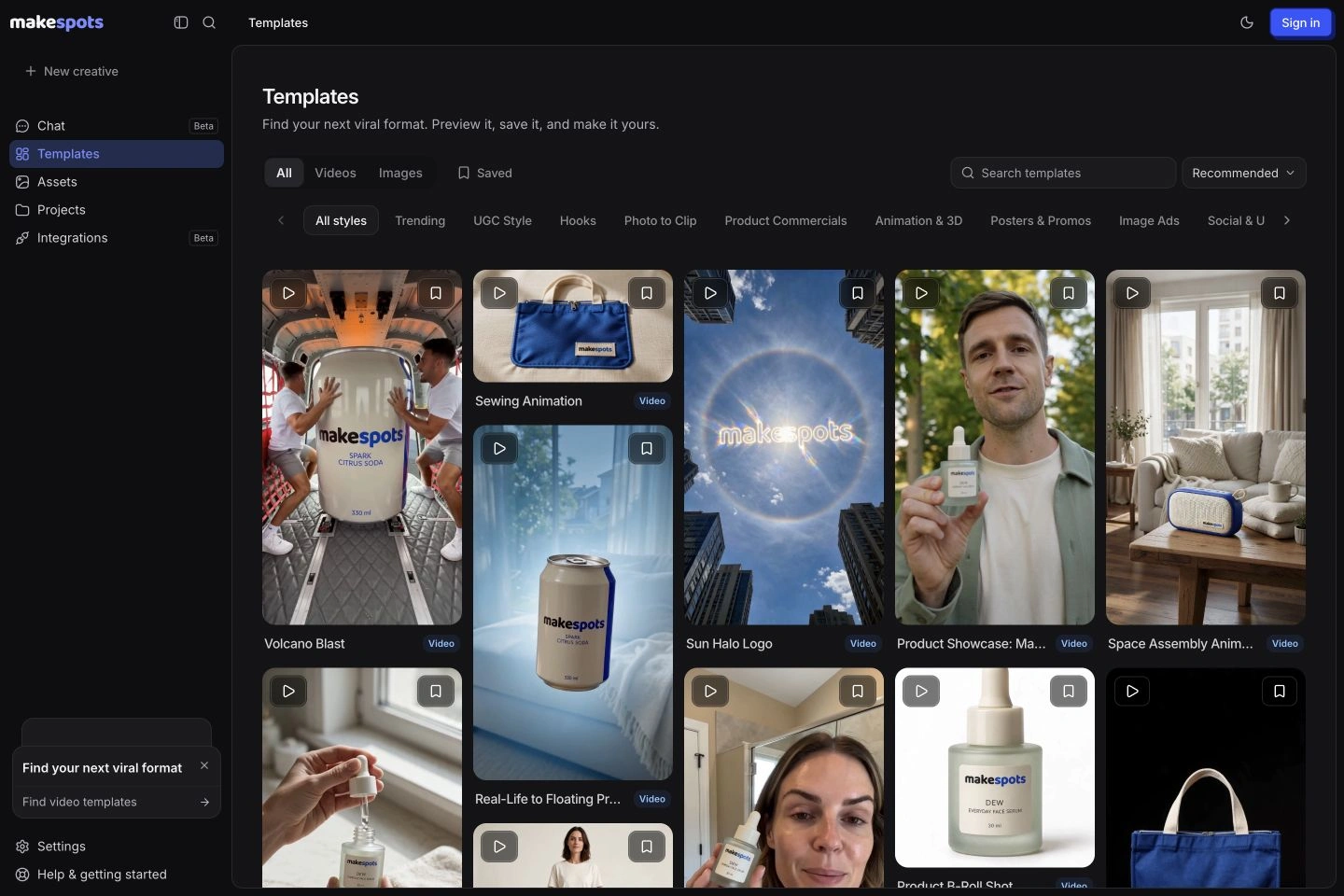 Official public product page
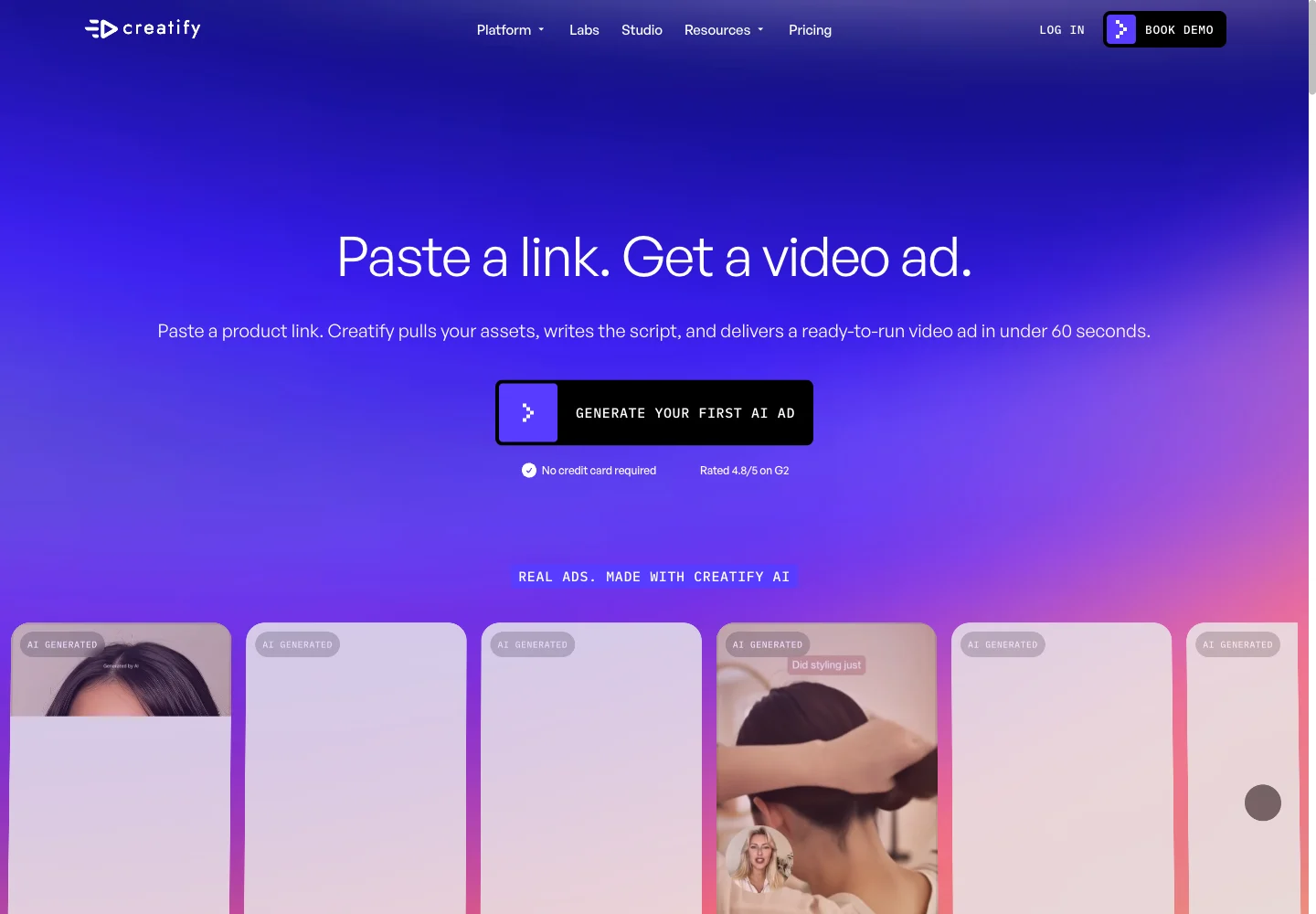
Competitor capture reviewed November 10, 2026. Open a screenshot to inspect it at full size. Public-page visuals illustrate the advertised workflow; they are distinct from a generated-output benchmark.
makespots vs. Creatify at a glance
The useful distinction is where you start and what you need after the creative is made. Both products cover multiple creative formats. This table compares the current makespots workflow with Creatify’s publicly documented offering; it is not a measured quality or speed ranking.
| What matters | | |
|---|---|---|
| Starting point | Choose a template and add the required product assets. | A product link, template, or another creation tool. |
| Template discovery | 20 published templates with previews and input guides. | Template allowances vary by plan; check the live catalog. |
| Template allowance | 20 curated public formats with detailed input guides. | Standard lists 200+ templates; Pro and above list 500+. |
| Video and image ads | Published formats for both, including reveals and UGC-style creative. | Both are listed in the public platform. |
| Creative control | Editable template workflow, source assets, and project variations. | Review the specific creation flow and plan you need. |
| Actors and custom avatars | UGC-style formats; use each template’s documented controls. | Standard lists 300 actors; Pro lists 1,500 actors and 3 custom avatars. |
| Team capacity | Saved projects, reusable assets, and project duplication. | Ultra lists 3 seats; Business lists 10 seats at its entry allowance. |
| Wider ad operations | Evaluate it for template discovery and creative production. | Advertising intelligence and integrations are part of its wider offering. |
| Cost comparison | Plan credits plus a quote for the selected workflow. | Plan-, model-, and billing-period-specific allowances. |
| Best evaluation | Make a product creative, then one controlled variation. | Test the same brief and any wider platform features you require. |
Official sources:Creatify platformCreatify URL to VideoCreatify pricing
When looking beyond Creatify makes sense
Looking for an alternative does not necessarily mean your current tool is failing. You might be adding a different creative format, trying to make a product visually distinctive, or changing the way your team starts a brief. Write down the missing job before comparing subscriptions.
For example, a founder with one product photo may need a strong visual reveal more urgently than another talking-head script. A media buyer who already has a reliable presenter workflow may need fresh supporting shots. A team producing the same successful format every week may care most about preserving the brief and changing only one variable.
Separate a creative problem from a workflow problem. ‘The opening is weak’ calls for another hook or visual idea. ‘We lose track of our versions’ calls for a clearer project process. ‘We need ad-account automation’ calls for a different platform capability. Buying a tool for the wrong problem leaves the original bottleneck in place.
- Write one sentence describing the output you need this week.
- List the assets you already have and the assets you would need to create.
- Choose one success criterion: a usable reveal, an approved spoken ad, or a controllable next version.
Find the creative direction before writing the prompt
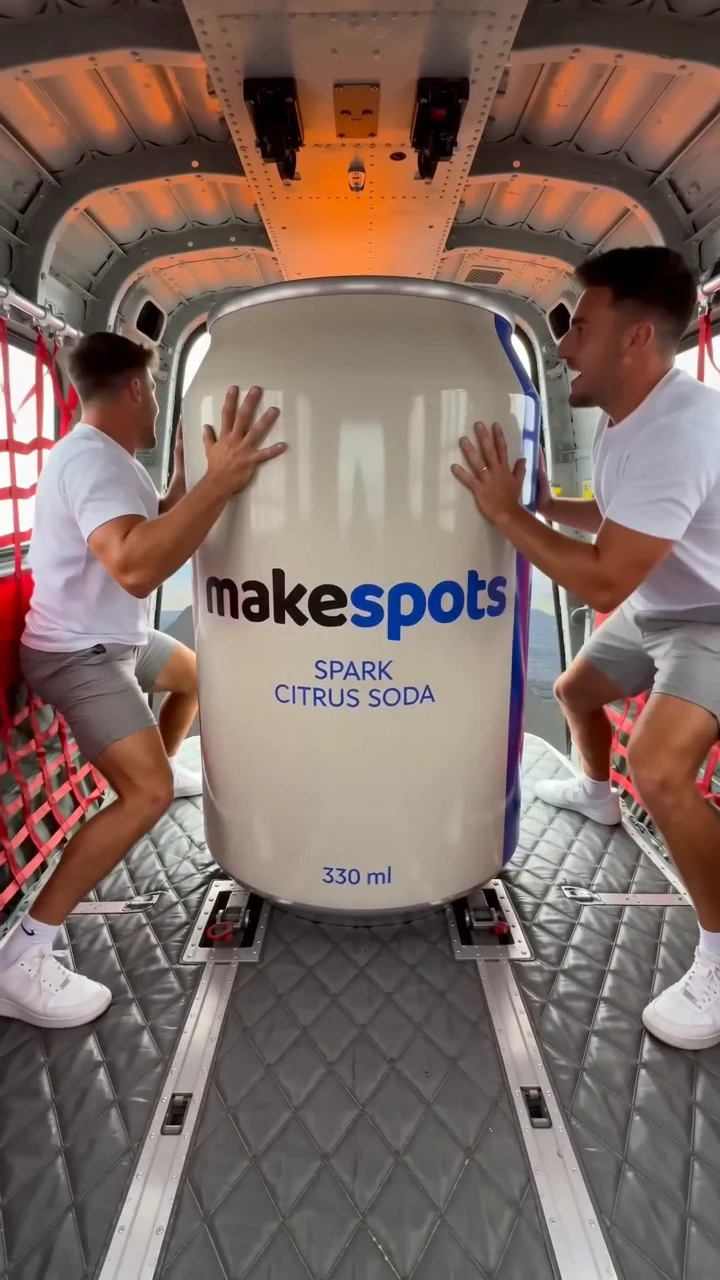
In makespots, template discovery is the starting point. The launch collection contains 20 curated templates: 12 video formats and eight image formats. Each published template has a preview and a guide explaining its inputs and creative approach. Browse the output first, then decide whether your product belongs in that scene.
This is useful when you can recognize a good direction more easily than you can describe it from a blank page. A reveal built around a large environment suggests a different product story from a quiet studio shot or a creator holding the item. Choosing that structure early gives your reference image and instructions a specific job.
Creatify also offers templates. Do not choose makespots on the assumption that templates are unique to it. Compare how easily you find a relevant example, understand what it requires, and adapt it to your product. A large catalog is helpful only when it leads you to a usable direction.
The tradeoff is selection breadth. makespots currently has a deliberately small public collection. If none of its published formats fits your brief, a larger library or a more open production workflow may serve you better. Review the live collection before signing up for a plan.
Official sources:Creatify pricing
Product assets and product links lead to different starting points
Creatify documents a URL-to-video flow that takes a product link, extracts assets, and develops a video ad. That entry point can be useful when the product page already holds the material you want to work from. Check the extracted images and message against the exact product version and offer before treating the draft as ready.
makespots starts from a chosen format and the assets required by that template. A product image can anchor the appearance of the item while editable instructions establish the setting, action, or reveal. That approach asks you to choose the creative direction, but also makes the requested scene explicit before generation.
A useful evaluation is to bring a product photo with small packaging text, a distinct silhouette, and a recognizable color. Give both workflows the same factual brief. Review whether the shape stays plausible, the right version appears, and the opening communicates the intended idea without needing an explanation.
Treat the product reference as source material, not a guarantee of exact reproduction. Inspect labels, hands, reflections, and transitions in the generated result. If exact packaging text is essential, plan a separate approved end card or use a source asset where the text must remain unchanged.
Introduce the cobalt-blue insulated bottle in a 15-second vertical ad. Show the same bottle and cap throughout. Open with a visual reveal, then one everyday use moment, and end on the product. Use only the approved claim: 750 ml capacity. Do not invent temperature, durability, or customer-review claims.
Official sources:Creatify URL to Video
Evaluate the delivery, not just the avatar library
UGC-style ads have several separate requirements: a believable opening, natural spoken delivery, a product moment that supports the message, and a clear next action. An attractive presenter does not resolve an awkward sentence or an implausible product interaction. Evaluate these parts individually.
makespots includes published UGC-style formats alongside product reveals and image ads. Inspect each template’s controls before choosing it: a spoken format may need dialogue and a setting, while a hands-led format may depend more on product references and the action you describe. These formats are not interchangeable with a dedicated custom-avatar system.
Creatify publishes an AI actor offering with plan-specific allowances. If a large actor selection or custom avatars is a requirement, review its current plan matrix. For an actor-centered shortlist, also inspect Arcads and MakeUGC rather than forcing a general product creative workflow to cover every presenter use case.
For the first trial, keep the spoken message short and use one approved claim. Watch the result with sound for pronunciation and pacing, then muted for caption legibility and the product story. A version that makes sense in only one viewing condition still needs work before you put media spend behind it.
Official sources:Creatify pricingArcads: AI UGC AdsMakeUGC product
Make the next version without losing the original idea
A first draft answers whether the concept is worth pursuing. The next draft answers whether you can improve it without accidentally changing everything that worked. Compare how the tool preserves source assets, instructions, and previous versions, as well as how it creates the first output.
In makespots, a template opens into an editable workflow. Use the project to inspect the creative steps, keep the product references together, and duplicate the project before exploring another direction. Available generation options and credit quotes depend on the selected workflow and connected models.
Start with one controlled change. If you are comparing openings, keep the product, offer, and ending consistent. If you are comparing a studio scene with an outdoor scene, hold the spoken message constant. This makes the creative review easier to explain and gives later campaign results a more interpretable context.
An editable workflow also introduces responsibility. Someone needs to check the inputs, understand which steps changed, and review the final assembly. If your team wants the fewest possible production decisions, try a guided flow with your actual brief and compare the amount of intervention each approach requires.
Build a useful creative mix for the product
A new campaign may need a strong still image as much as a new video. A static concept can make the packaging, offer, or visual setting easier to judge before you commit to motion. A short reveal can then explore the entrance, transition, or product interaction that a still image cannot show.
makespots has both image and video templates in its published collection. Choose a format for the job: a clear product scene, a visual transformation, a logo treatment, or a creator-style moment. Read the template’s input requirements; a logo workflow and a product-reference workflow do not necessarily accept the same source asset.
Creatify also lists image ads and multiple video styles, so this is not an image-versus-video distinction. Compare whether each tool supports the specific composition you need, how much correction the output requires, and how consistently your team can reproduce the creative direction.
Do not assume an image-to-video step will preserve every detail of an approved still. Review the moving version at the beginning, middle, and end. A warped label or changing product shape can undermine an otherwise appealing shot, especially when the item occupies most of a vertical frame.
Official sources:Creatify platform
Compare the cost of a usable creative
A subscription price is the beginning of the comparison. Establish the billing period, included usage, generation model, resolution, duration, and likely revision budget. Credits are product-specific units: 100 credits in one platform do not imply the same output as 100 credits in another.
The makespots plans below come from the same configuration as our pricing page. The example output budget uses the current standard generation rates. It is a planning example for a specified workflow, rather than a promise about every template or a benchmark against Creatify.
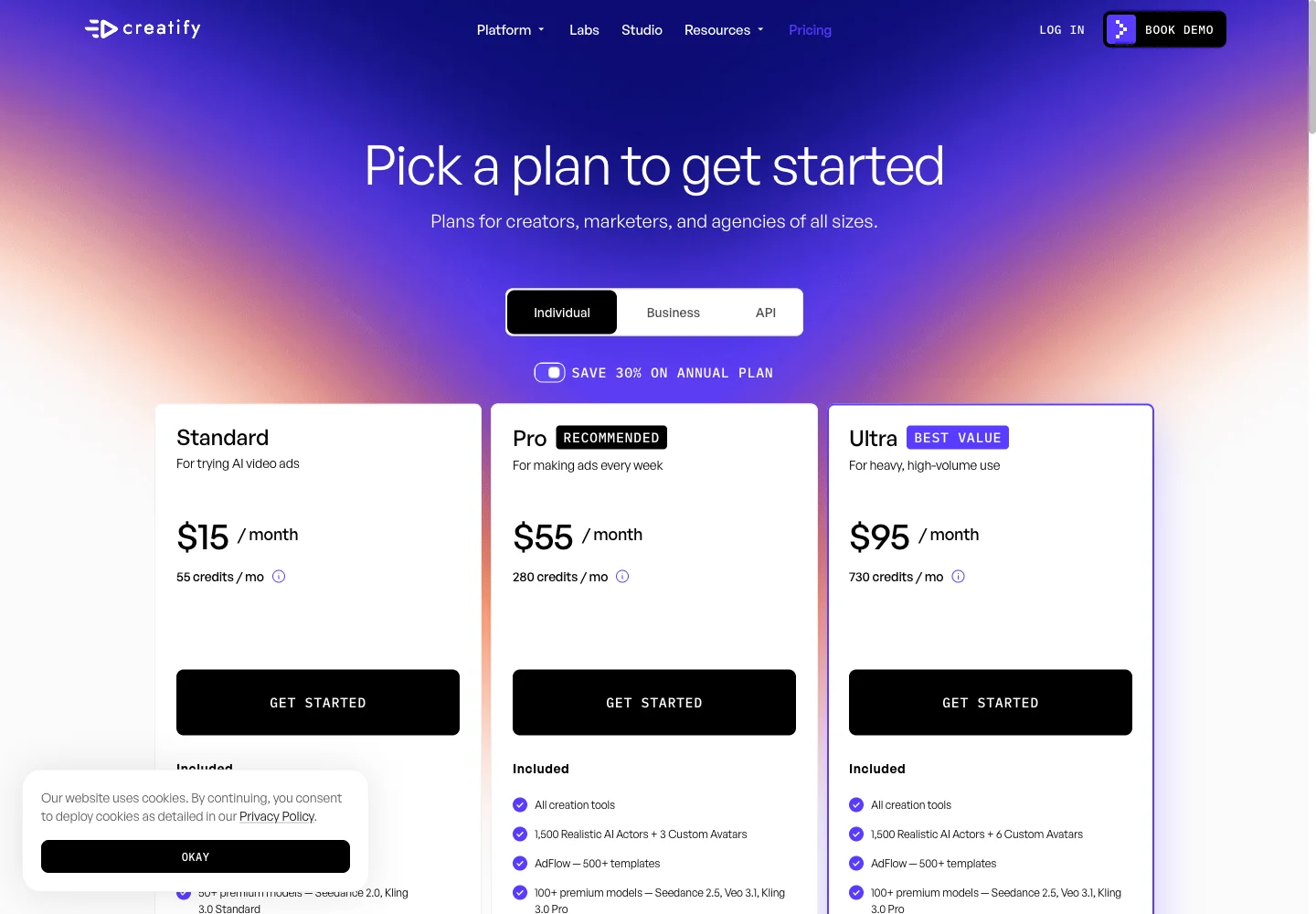
Creatify’s public pricing separates individual, business, and API offers. It also shows annual billing promotions and different generation allowances by model. Review the live billing selection before comparing a displayed monthly equivalent with a month-to-month subscription. Its API credits and app-plan credits should be evaluated within their respective offers.
Use a realistic revision allowance. If you need three candidate openings and expect to revise two of them, budget for five generation attempts plus any image, speech, and assembly work. Compare your actual account quotes for that small batch, then divide the total by the number of outputs you would approve for use.
| Creatify plan | USD / month | Credits / month |
|---|---|---|
| Standard | $15 | 55 |
| Pro | $55 | 280 |
| Ultra | $95 | 730 |
| Business | $195 | 1,500 |
Monthly billing was selected in the live pricing interface. Business is shown at its entry allowance. Annual monthly-equivalent offers, larger credit bundles, API plans, Enterprise agreements, and managed Studio services have separate terms.
| Plan | Monthly price | Credits / month | Parallel generations |
|---|---|---|---|
| Starter | $29 | 800 | 1 |
| Pro | $59 | 2,400 | 2 |
| Scale | $119 | 5,600 | 3 |
274 credits for an illustrative 15-second draft
- Three 5-second Standard video clips
- 3 × 80
- Three large generated images
- 3 × 10
- Short script + short voiceover
- 2 + 2
- Illustrative draft total
- 274 credits
Standard video here means Seedance 2.0 at 720p without video references. Other models, text lengths, references, processing steps, and revisions can change the quote. This is a defined makespots example, not an equivalent-output cost benchmark against Creatify.
The trial provides 160 credits for 7 days, less than this full example. Review the workspace quote and choose a smaller first test if needed.
Official sources:Creatify pricing
Run the same small brief in both tools
Before moving a whole content process, make one representative creative. Use a product you understand, a reference you have permission to use, and a brief that could plausibly become a real ad. Avoid testing with a spectacular example that has nothing to do with your weekly work.
For the bottle brief above, prepare a clean front image, one useful angle, the exact product name, and the approved claim. Set the same target duration and aspect ratio in both tools where supported. Choose the closest available production path and record any extra work needed to make the comparison fair.
Review the first two seconds for a clear opening; the middle for product consistency and a believable action; and the ending for an understandable next step. Record total credits spent, time spent actively editing, and the issues that prevented approval. Queue time and hands-on work are different costs, so record both.
Once a draft passes review, make one variation with a changed opening. This second task often exposes a workflow difference that the first output hides: whether you can keep the same product, preserve the useful direction, and make a controlled change without rebuilding the brief.
Your evaluation can identify the better production fit. It cannot establish ad performance without an actual campaign test. If you test the creatives in an ad platform, document the audience, placement, spend, and decision rule so a production preference does not become an unsupported ROAS claim.
- Product fidelity: correct shape, color, packaging, and version.
- Message: the opening and approved claim are clear and accurate.
- Delivery: natural speech, readable captions, and plausible movement where used.
- Revision control: a new opening can be made without losing the approved elements.
- Usable output cost: all attempts and hands-on work needed for an approved version.
When to try makespots, and when to keep Creatify
Try makespots when your immediate job is choosing an ad format and adapting it to a product. This fits a founder exploring a visual direction, a small brand making a fresh reveal, or a creative operator who wants to inspect and adjust the workflow behind a template. The live preview and the input guide should help you decide whether a format fits before you generate.
Keep Creatify on the shortlist when the broader platform is the reason you use it. If your team depends on its advertising intelligence, account connections, custom-avatar requirements, or API workflow, compare those requirements directly. makespots should not be treated as a verified replacement for every feature in another platform’s plan.
There is also a reasonable middle path: use a second tool for the creative job that your existing setup handles poorly. A product-reveal workflow can complement a presenter-led production process. Keep source assets and review criteria consistent so adding a tool does not add avoidable confusion.
Do not switch because of an isolated impressive preview. Switch when the new workflow produces an approved result with a manageable cost, and your team can repeat it. If a current process already does that well, a narrower experiment is more informative than replacing it wholesale.
Official sources:Creatify platform
Five other Creatify alternatives to put on your shortlist
makespots will not be the right choice for every Creatify user. These other tools are worth evaluating when the task centers on actor-led UGC, a recurring presenter, footage editing, or campaign creative. The recommendations describe workflow fit based on public product documentation; they are not hands-on quality rankings.

Arcads comparisonActors and ad workflows
Try makespots when you need a fresh visual product format. Keep Arcads on the shortlist when actor direction, custom performers, or its wider ad canvas is central to production.
Read the detailed guide
MakeUGC comparisonUGC and creative production
Choose makespots for a focused path from a visible product-ad idea to an editable project. Consider MakeUGC when actor interactions, its larger catalog, batch tools, or included API access are requirements.
Read the detailed guide
HeyGen comparisonAvatars and localization
Use makespots to explore product-led ad formats. Keep HeyGen on the shortlist when a repeatable personal avatar, longer presenter content, or translating existing video is the requirement.
Read the detailed guide
InVideo comparisonEditing and AI agents
Start with makespots for a template-led product creative. Consider InVideo when footage assembly, detailed editing, collaboration, or agent-assisted production is the central task.
Read the detailed guide
AdCreative.ai comparisonBrand creative and scoring
Try makespots for template-led product concepts and editable creative workflows. Consider AdCreative.ai for brand-layout production, multi-brand requirements, and its scoring or creative-analysis process.
Read the detailed guideMove a creative process one project at a time
Start with the source materials you own or are licensed to reuse: original product images, brand assets, approved scripts, final exports, and the written brief. Keep a local copy with clear product and version names. Check the rights attached to any third-party actor, voice, music, or stock asset before reusing it in another service.
Rebuild one representative project in makespots using the nearest suitable published template. There is no documented one-click Creatify project importer. Do not assume proprietary project structures, custom avatars, credit balances, or ad-account connections transfer between products. A final exported video is also different from an editable source project.
Review the first output with the person who normally approves your creative. Once it passes, duplicate the project for one meaningful variation. Preserve the source references, record what changed, and keep the previous export so the team can compare versions without relying on memory.
Only expand after this small process works. Make an inventory of the formats you need every month, check which are covered, and identify the jobs that still belong elsewhere. Before changing an existing subscription, review its renewal date and export requirements directly in that account.
- Gather original assets, approved claims, scripts, and finished exports.
- Choose one suitable template and inspect its required inputs.
- Recreate the brief, review the quote, and generate a small first draft.
- Approve the result and make one controlled variation.
- Document the remaining gaps before moving more work.
Before you choose a Creatify alternative
What is a good Creatify alternative for product ads?
Try makespots if you want to choose a visual ad template first and adapt it with your product assets. For actor-led UGC, also evaluate Arcads and MakeUGC. For a recurring presenter, consider HeyGen. The best fit depends on the creative you need and the workflow your team can repeat.
Is makespots cheaper than Creatify?
There is no verified like-for-like cost winner. Compare the live plans, billing period, generation model, duration, resolution, and revisions required for your brief. Each platform defines its own credits. The makespots planning example on this page does not establish an equivalent Creatify cost.
Does Creatify have templates and image ads too?
Yes. Creatify’s public site lists templates and image ads alongside its video and AI actor offerings. Compare the specific creative formats, input controls, and plan allowances you need rather than assuming those formats are exclusive to makespots.
Can I explore makespots before signing up?
You can browse the public template library and read the template guides as a guest. Uploading your own assets and saving a project require sign-in. Review the current pricing page for trial credits and the workspace quote for the cost of your selected workflow.
Can I import my Creatify projects into makespots?
There is no documented direct Creatify project importer. Bring source assets and scripts that you have the right to reuse, then recreate a representative brief in a suitable makespots template. Do not assume custom avatars, credits, account connections, or proprietary project files transfer.
Will switching tools improve my ad performance?
A production tool can change the creative you can make and how you make it. It cannot guarantee conversions, ROAS, or viral reach. Review the output for accuracy and quality, then test approved creatives against your own campaign objectives and audience.
How was this comparison researched?
The makespots descriptions reflect our implemented workflow and published template collection. Competitor descriptions are based on the linked official product pages reviewed on November 10, 2026. We have not run a controlled cross-platform generation or ad-performance benchmark. Pricing and plan allowances can change.
What this comparison is based on
Official product pages, documentation, and selected public billing states were reviewed on . makespots descriptions reflect the implemented product and published collection. Each image caption distinguishes a public competitor page from our own product interface.
The worked briefs and choice recommendations are original editorial analysis. We have not run a controlled cross-platform generation or advertising-performance benchmark. Screenshots document product presentation, while pricing snapshots need to be checked against the current account offer.
- Creatify platformProduct scope, ad creation, intelligence, and integrations.
- Creatify URL to VideoProduct-link input and the URL-to-ad workflow.
- Creatify pricingPlan names, billing options, credits, and plan-specific allowances.
- Arcads: AI UGC AdsActor-led videos, scripts, voice direction, and variations.
- MakeUGC productTalking actors, product-in-hand creative, and content workflows.
- HeyGen platformPersonal avatars and presenter-led video creation.
- InVideo editorFootage-led, agent-assisted editing and video production.
- AdCreative.ai platformAd creative generation and creative scoring tools.
Brand names and logos belong to their respective owners and are used to identify the products compared. Publication by makespots does not imply affiliation or endorsement.