Choose around the subject of the video
makespots is a useful HeyGen alternative for a specific job: finding a product-ad format and adapting it with your own assets. You might need the object to appear in a distinctive environment, enter through a reveal, or support a short UGC-style message. The visual execution is the first decision, and the template gives that decision a concrete reference.
HeyGen is relevant when the person is the recurring subject. Its public product emphasizes personal avatars, scripted delivery, editing, and video translation. A founder appearing repeatedly in explainers or a team localizing an established presenter may need those capabilities more than another visual product concept.
This is not a complete replacement claim. makespots should not be selected on the assumption that its UGC-style templates recreate HeyGen’s personal-avatar system or localization workflow. The comparison is useful because it identifies which part of your content program belongs in each kind of tool.
 Choose makespots for
Start with an ad execution: a product reveal, UGC-style scene, or image concept.
 Consider HeyGen for
Build video around a presenter, personal likeness, scripted delivery, and localization.
Official sources:HeyGen platformHeyGen translation engines
See where makespots and HeyGen begin
The makespots library starts with the ad’s visual treatment. A preview shows whether the format revolves around a product, a person, a hand interaction, or an environmental reveal. A brand can use that evidence to choose the execution before writing the complete production brief.
HeyGen’s public homepage frames video around the presenter and personal avatar. Its subsequent product sections explain avatar behavior, editable creation, and translation. The screenshot is a public product presentation, not an account dashboard, and the comparison below separates those visible product claims from our recommendations for ad-production fit.
Template library · real product interface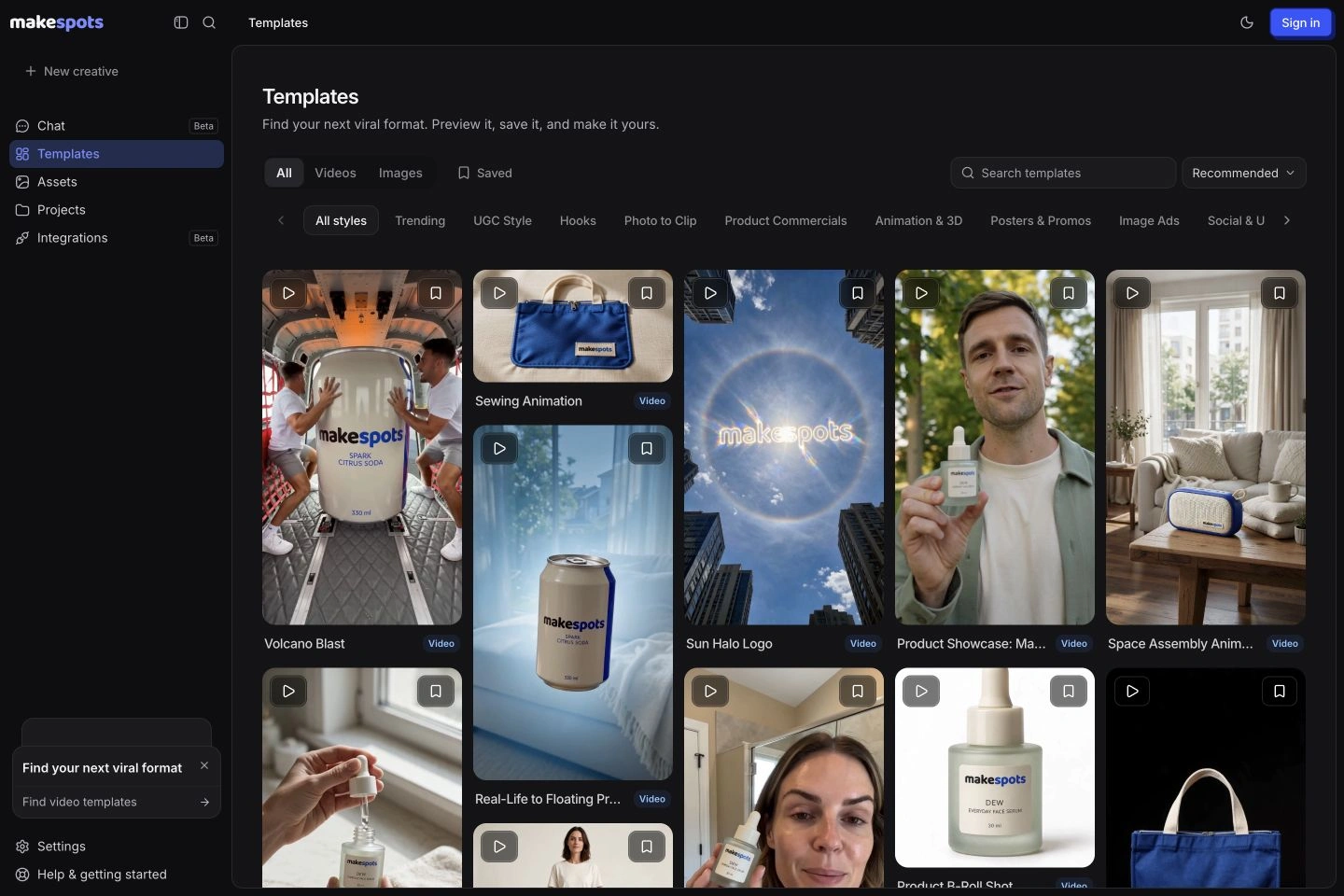 Official public product page
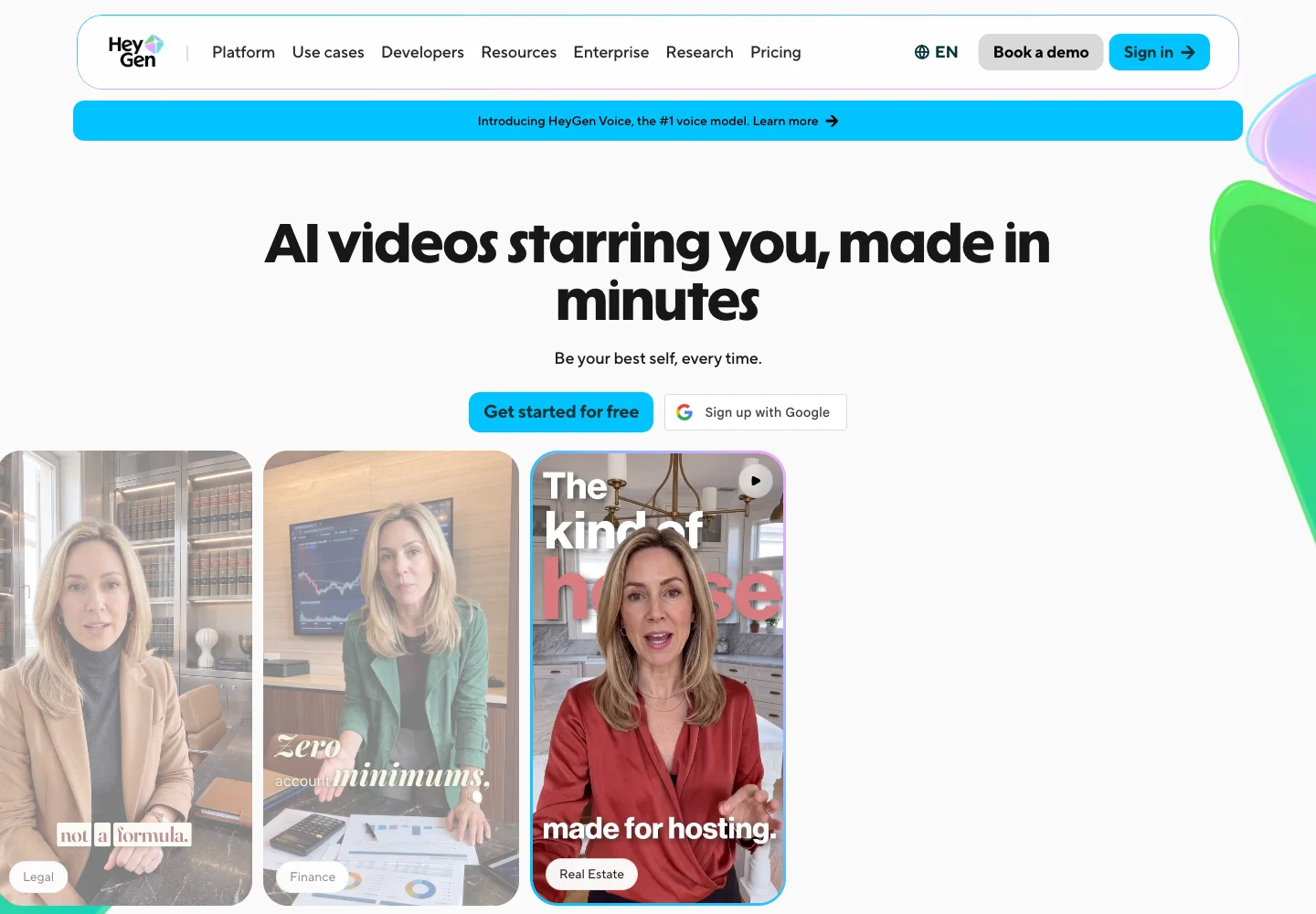
Competitor capture reviewed November 10, 2026. Open a screenshot to inspect it at full size. Public-page visuals illustrate the advertised workflow; they are distinct from a generated-output benchmark.
makespots vs. HeyGen by content requirement
Compare product advertising, personal-avatar content, and localization as separate jobs. A tool can support video creation without providing the same identity controls, translation process, or visual-format library. The right evaluation brief should reflect the part of production you intend to repeat.
| What matters | | |
|---|---|---|
| Starting point | A visible ad format and its product inputs. | A presenter, personal avatar, script, or video-creation request. |
| Primary evaluation | The visual direction and editable product-ad workflow. | Identity consistency, spoken delivery, and presenter editing. |
| Product reveals | Multiple published reveal and visual-transformation formats. | Evaluate within the specific creation path and model allowance. |
| Personal avatar | No equivalent persistent custom-person system is established here. | A core public product capability with plan-specific allowances. |
| Video localization | Inspect the selected workflow’s speech and language support. | A documented video-translation and localization workflow. |
| Editing | Template workflow, product references, and project variations. | AI Studio editing for text, timing, layout, and related video controls. |
| Business requirements | Check the current workspace against team needs. | Business plan lists shared workspace, brand assets, and business controls. |
| Best first test | A product launch creative with one revised opening. | A recurring-presenter clip and, if relevant, a language adaptation. |
Official sources:HeyGen platformHeyGen pricingHeyGen translation engines
A persistent presenter is a different requirement from a UGC-style scene
A personal avatar can be valuable when the same founder, educator, or subject-matter expert needs to appear consistently across many videos. Viewers recognize the person, and the team wants to update the script without scheduling a new shoot for every message. HeyGen’s public product is built around that recognizable presenter use case.
A UGC-style ad template solves a different creative task. It establishes a presentation format that can be adapted for a product, but it does not automatically create a persistent digital version of a specific person. In makespots, inspect the chosen template’s references, dialogue, and setting controls before deciding whether it fits the desired presentation.
If identity consistency is essential, evaluate several scripts rather than one attractive sample. Look for continuity in the face, voice, gesture, and overall presentation. If the job is a product-focused ad, evaluate whether that identity is necessary at all. A clearer product moment may be more useful than introducing a speaker into a concept that does not need one.
Official sources:HeyGen platform
Let the product carry the opening when that is the strongest idea
A product reveal can establish what is being advertised before the audience hears a sentence. A scene change, unusual scale, or a carefully chosen environment gives the object a visual role. makespots organizes these creative directions as previews that lead into editable workflows, so you can choose the mechanism before supplying the product reference.
A presenter-led video can instead establish context, credibility, or an explanation. That is useful when the buyer needs to understand a service or a difficult idea. The practical question is whether the opening benefits from seeing the person first, the product first, or a sequence that deliberately uses both.
For a new skincare package, try an opening that clearly introduces the bottle and one that introduces the routine through a speaker. Keep the approved product facts and final action constant. Review the ideas for clarity before producing many versions. A format library is useful when it helps the team make that creative choice deliberately.
Translating an existing video is not the same job as generating another ad
HeyGen’s official translation announcements describe modes for localizing video while preserving the presenter’s delivery and synchronizing the translated presentation. That is relevant when you already have a source video and want the same content to reach another language audience. It is a dedicated localization requirement rather than a generic text-to-video task.
makespots should be evaluated against the actual language and speech controls available in the selected workflow. This comparison does not establish an equivalent system for translating an existing presenter video while preserving a specific person’s likeness. If that is the job, test HeyGen’s localization workflow directly.
A good localization review goes beyond the number of languages listed. Check product names, pronunciation, legal or offer text, the meaning of the claim, and the timing of the final action. Use a reviewer who understands the target language. A fluent-sounding result can still communicate the wrong promise or an offer that does not apply in that market.
Official sources:HeyGen translation engines
Preserve the part that makes the next video recognizable
In makespots, the reusable parts are the product assets, chosen format, creative instructions, and editable project. Save an approved reference and duplicate the project before trying another opening or setting. This keeps the reason for the variation visible to the person reviewing it.
HeyGen’s public site describes AI Studio editing for text, color, timing, and layout. A presenter program may need those controls to maintain a recognizable frame while the script changes. Compare a realistic edit, such as replacing one sentence and adjusting the caption layout, rather than only requesting an entirely new video.
A production handoff should state what is fixed: presenter, product version, approved wording, background, or final card. Then state the one element that changes. This makes review more efficient regardless of which tool you use and prevents an otherwise useful revision from quietly changing a brand or product detail.
Official sources:HeyGen platform
Price the video workflow, export needs, and team access together
HeyGen’s public individual pricing lists Free, Creator, and Pro, with a separate business offer. The reviewed monthly prices were $29 for Creator, $49 for Pro, and $149 for Business. The Free tier is a limited way to explore the product, with watermarked outputs and per-video restrictions rather than the same capacity as a paid plan.
The plan differences include credits, generation access, export resolution, video duration, and business controls. For a team, verify the workspace and additional-seat terms rather than multiplying an individual creator price and assuming that supplies the collaboration process you need. API pricing is a separate offer from the app plans in this table.
For a useful budget, count the source video, additional language versions, rerenders after script review, and any required export quality. A recurring presenter program may have a different cost pattern from a short product-ad program. Compare the actual operations you expect to perform, not just the headline monthly subscription.
| HeyGen plan | USD / month | Reviewed app allowance |
|---|---|---|
| Free | $0 | 3 videos / month; watermarked |
| Creator | $29 | 600 credits |
| Pro | $49 | 1,000 credits |
| Business | $149 | 1,500 credits; verify additional-seat terms |
Monthly app-plan prices from the official pricing page. Annual billing, added credits, additional seats, and API plans have separate terms. Generation access, duration, and export limits differ by plan.
| Plan | Monthly price | Credits / month | Parallel generations |
|---|---|---|---|
| Starter | $29 | 800 | 1 |
| Pro | $59 | 2,400 | 2 |
| Scale | $119 | 5,600 | 3 |
274 credits for an illustrative 15-second draft
- Three 5-second Standard video clips
- 3 × 80
- Three large generated images
- 3 × 10
- Short script + short voiceover
- 2 + 2
- Illustrative draft total
- 274 credits
Standard video here means Seedance 2.0 at 720p without video references. Other models, text lengths, references, processing steps, and revisions can change the quote. This is a defined makespots example, not an equivalent-output cost benchmark against HeyGen.
The trial provides 160 credits for 7 days, less than this full example. Review the workspace quote and choose a smaller first test if needed.
Official sources:HeyGen pricing
Test a launch ad and a founder update as two different briefs
For the product-ad brief, bring the same clear reference image and approved product statement. In makespots, choose a visual format that fits the intended opening. In HeyGen, choose the presenter or creation route you would actually use for the job. Judge whether the video makes the product and next action clear within the intended duration.
For the founder update, define the recurring speaker, audience, and message before generation. Evaluate identity continuity, pronunciation, pacing, captions, and whether the team can revise the script cleanly. This second brief tests a requirement that the product reveal does not cover. Keeping the tasks separate makes the result more useful than declaring a universal video-tool winner.
If localization is essential, add one target-language version after approving the original. Have a competent reviewer check the translated meaning and product names. Record the full production cost, including failed or revised attempts, and the work needed to obtain approval. Those observations establish workflow fit without pretending to predict campaign performance.
Brief A: a 15-second vertical introduction to the approved serum bottle, led by the product’s visual entrance. Brief B: a 45-second founder update using a recognizable recurring presenter, followed by one reviewed language adaptation. Keep the audience, approved facts, and intended action explicit for each.
Choose the tool for the content program you are building
Try makespots for a product-led advertising program that needs new visual formats and reusable creative projects. The public examples help a small team choose the direction, and the input guides make asset preparation concrete. This is especially useful when the creative question is how the product should appear rather than which person should deliver the message.
Keep HeyGen under consideration for personal-avatar videos, recurring presenter content, video localization, or a business process built around its studio and team controls. If those are established requirements, a different product-ad workflow should complement them until you have verified a complete replacement for the particular job.
An organization can use a recurring presenter for explanation and a separate product-led piece for acquisition creative. Keep the final assets, approved scripts, and brand references aligned. The fact that two workflows serve the same product does not mean they need to be produced in the same interface.
Preserve identity rights, source scripts, and localized approvals
There is no documented direct HeyGen project or personal-avatar importer in makespots. Export the final material you are entitled to reuse and preserve the original scripts, product images, brand assets, and translation approvals. Check the rights attached to a person’s likeness and voice before using them in another system.
Recreate one product-ad brief in makespots before moving a wider program. Identify what still depends on HeyGen: a particular presenter, script-to-avatar behavior, video translation, or business review flow. A successful product concept does not establish that those presenter and localization requirements have transferred.
Keep a versioned source script for every language and product update. When a price or feature changes, that record helps identify which videos need to be revised. Review the account’s current cancellation and export terms before changing a subscription, and make sure the team can still locate the approved final assets.
- Keep original scripts, product references, and approved exports.
- Identify presenter, voice, translation, and team-control dependencies.
- Verify likeness and voice permissions for any reuse.
- Rebuild one product-ad workflow before moving recurring presenter work.
Before you choose a HeyGen alternative
What is a good HeyGen alternative for product advertising?
makespots is worth trying when you want to start with a product reveal, UGC-style format, or image-ad concept. If you need a recurring personal avatar or video translation, compare those specific workflows separately rather than assuming every video tool provides them.
Does makespots offer the same personal-avatar system as HeyGen?
This comparison does not establish an equivalent persistent personal-avatar system. makespots offers template-led product creative and UGC-style formats whose controls vary by template.
Can makespots translate my HeyGen video into other languages?
An equivalent existing-video localization workflow is not established here. Review the language and speech capabilities of the selected makespots workflow, and evaluate HeyGen directly when preserving the same presenter across translations is essential.
What did HeyGen’s monthly plans cost when reviewed?
The official app pricing listed Creator at $29 per month, Pro at $49, and Business at $149, alongside a limited Free tier. Check the current billing selection, credits, seat terms, and export allowances before purchasing.
Can I transfer my HeyGen avatar and editable project?
There is no documented direct importer. Preserve the original script, reusable source materials, and approved exports, and check permissions for any person’s likeness or voice before reuse.
Which tool should a founder try first?
For a visually distinctive product ad, start by examining makespots’ published formats. For regular videos starring the same founder or a localization program, evaluate HeyGen’s presenter workflow. A small test of the actual recurring job is more useful than a generic feature score.
What this comparison is based on
Official product pages, documentation, and selected public billing states were reviewed on . makespots descriptions reflect the implemented product and published collection. Each image caption distinguishes a public competitor page from our own product interface.
The worked briefs and choice recommendations are original editorial analysis. We have not run a controlled cross-platform generation or advertising-performance benchmark. Screenshots document product presentation, while pricing snapshots need to be checked against the current account offer.
- HeyGen platformPersonal avatars and presenter-led video creation.
- HeyGen pricingIndividual and business plans, credits, seats, and export allowances.
- HeyGen translation enginesOfficial announcement of translation modes and supported languages.
Brand names and logos belong to their respective owners and are used to identify the products compared. Publication by makespots does not imply affiliation or endorsement.