Format discovery and footage editing begin with different questions
makespots is useful when the first question is what kind of ad to make for a product. The library gives you visible examples, their required inputs, and a workflow you can adapt. That can be a direct route from a product reference to a chosen creative direction when you do not already have a sequence of footage to assemble.
InVideo’s current public product centers on an agentic editor. It presents footage editing, a timeline, AI agents, and collaborative production. That is relevant when you have raw material and want to shape a cut, or when you want an editing environment that can combine supplied and generated pieces.
Compare the products around a concrete recurring job. A visually distinctive product reveal and a 60-second edit assembled from interviews are different production tasks. The same team can need both, but a successful test of one does not establish that a tool can replace the other workflow.
 Choose makespots for
Choose a product-ad format first, then supply the references and adapt its workflow.
 Consider InVideo for
Build and refine videos through footage, a timeline, AI agents, and a broader editing environment.
Official sources:InVideo editorInVideo documentation
See where makespots and InVideo begin
The makespots library shows the intended visual format before the project is assembled. Choose a reveal, a UGC-style treatment, or an image concept, then inspect the workflow’s inputs. This gives a product-focused team a concrete direction even when the available source material is mainly still photography.
InVideo’s public page introduces its editor with a timeline and agents. That makes the editing environment a visible part of its proposition. The screenshot below documents the public page, not an account project. When evaluating the actual tool, bring representative source footage and a specific editing request so the test reflects how your team works.
Template library · real product interface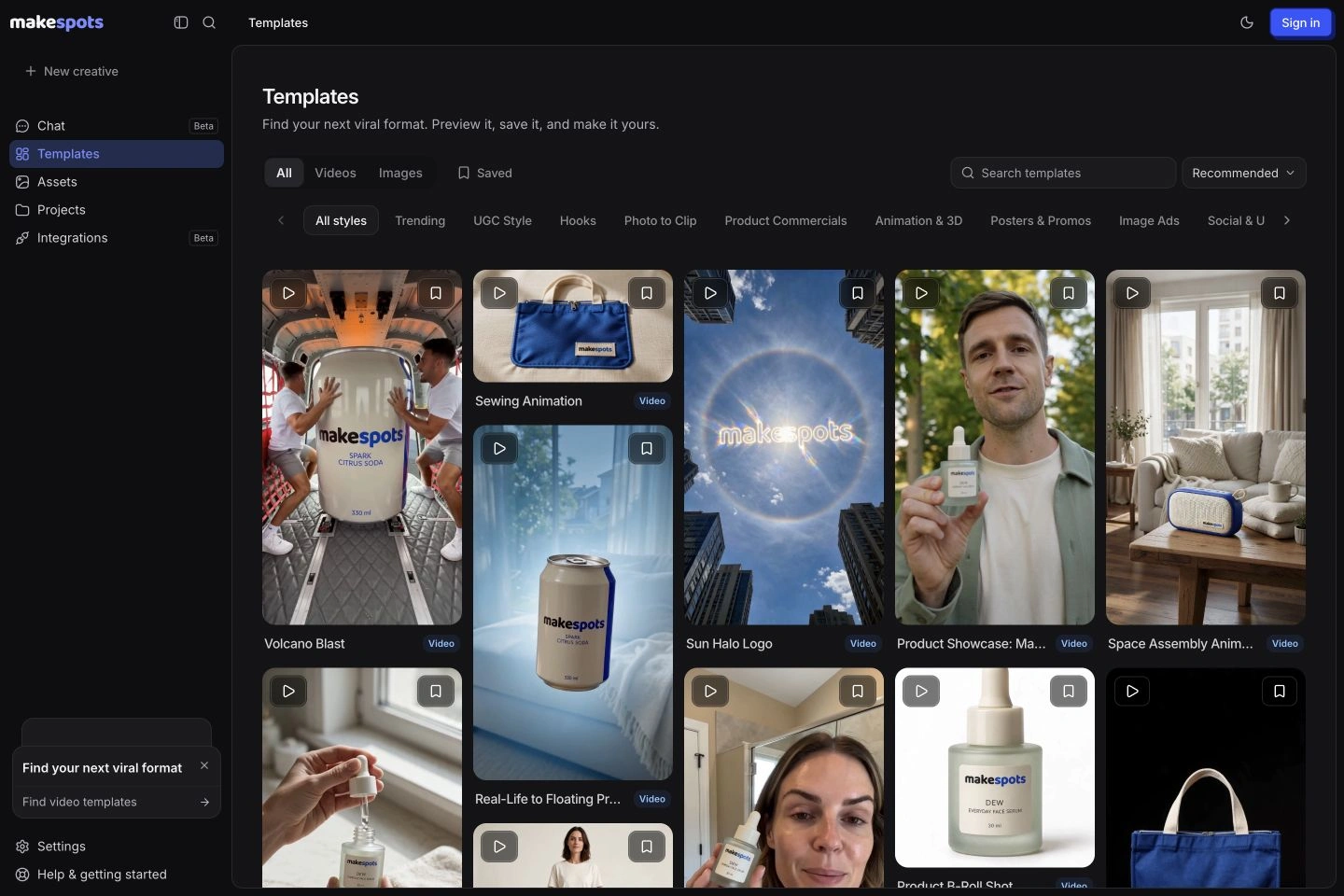 Official public product page
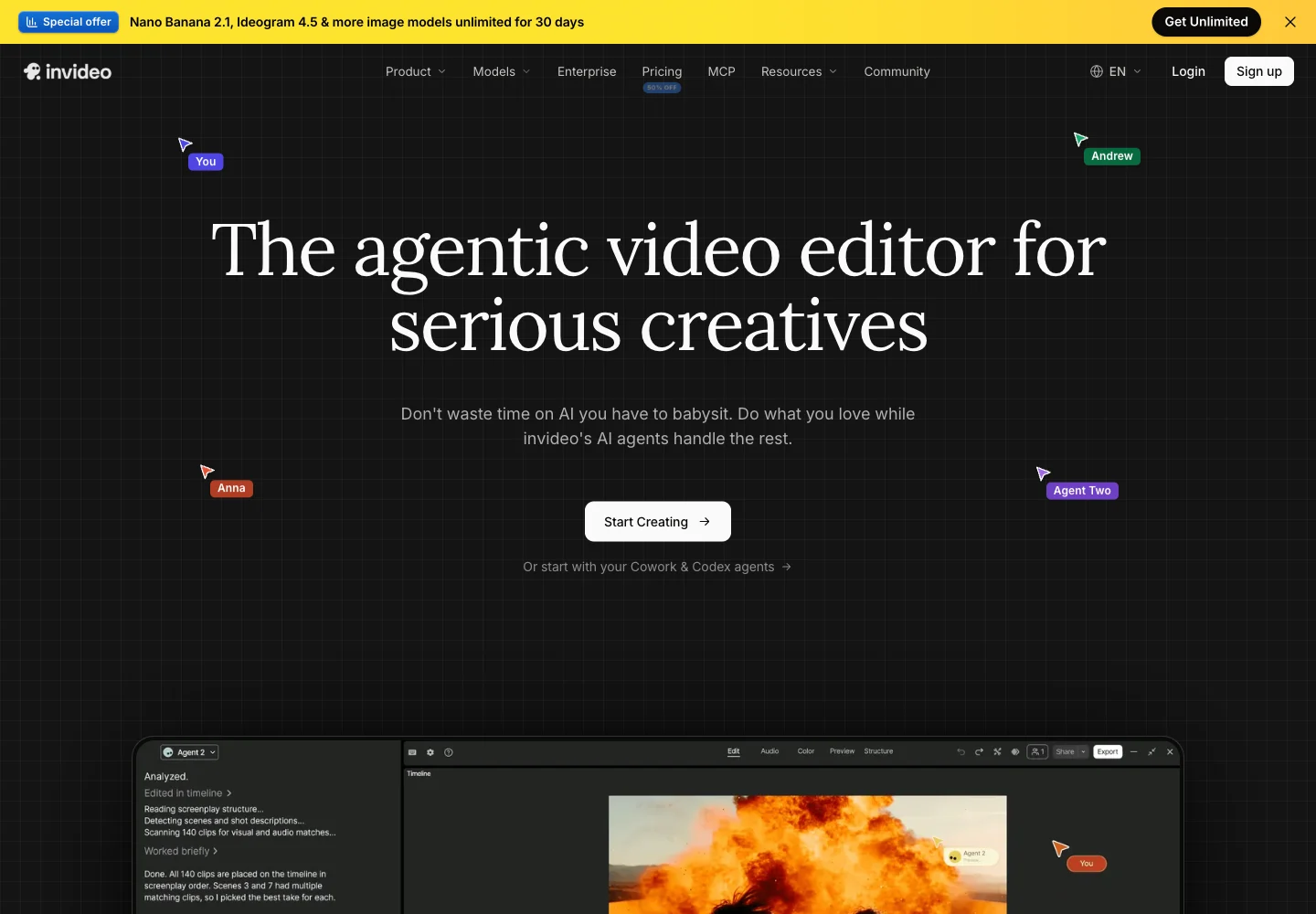
Competitor capture reviewed November 10, 2026. Open a screenshot to inspect it at full size. Public-page visuals illustrate the advertised workflow; they are distinct from a generated-output benchmark.
makespots vs. InVideo: discovery, assembly, and control
Look beyond the shared ability to make a video. Compare how the idea is selected, where the source material comes from, what can be edited, and which operations consume credits. InVideo’s current plans also use seat-specific allowances, which need to be priced separately from a single creator’s production budget.
| What matters | | |
|---|---|---|
| Starting point | Find a visual product-ad format, then prepare its inputs. | Upload footage, describe a result, or work through the editor and agents. |
| Format discovery | Published product reveals, UGC-style formats, and image concepts. | A broader editor with model and agent-based production paths. |
| Existing footage | Inspect the selected workflow’s supported inputs and editing controls. | Footage assembly and timeline editing are core public workflows. |
| Editing control | Template steps, source references, and project variations. | Timeline editing, AI-assisted changes, and broader editing tools. |
| AI usage | A project-specific quote before generation. | AI agents and generation use credits; manual editing is distinguished in official help. |
| Collaboration | Verify the current workspace against the team’s needs. | Multiplayer editing and plan-specific paid/guest-seat allowances. |
| Pricing unit | Monthly plan credits for the configured workspace offer. | Credits and subscription pricing per paid seat in the reviewed interface. |
| Best first test | A product concept with a controlled revised opening. | A representative footage edit, including the revision process. |
Official sources:InVideo editorInVideo pricingInVideo plans and credits
Use the material you have to choose a realistic production path
If you have a clear product photo and a product fact sheet, makespots provides formats that can use those assets as a starting point. The template guide explains what references or instructions are needed. Choose the format based on the role the product should play, then prepare a useful source image rather than starting with an entire storyboard of footage you do not have.
If you already have interviews, screen recordings, product demonstrations, or event footage, InVideo’s editing route may be the more relevant first evaluation. Bring the real clips and ask for a cut with a defined duration, message, and structure. The important question is how much the tool helps you select and arrange the material you own.
A mixed brief needs an explicit boundary between source footage and generated shots. For example, keep an approved demonstration as real footage while generating a separate product entrance. Label the role of each asset so the reviewer does not mistake a generated visual for evidence of a real product test or customer experience.
Separate the editing surface from the AI work performed on it
InVideo’s official help distinguishes manual timeline editing from AI work such as agent processing and generation. That matters because an editing request can involve more than moving an existing clip: the agent might review material, propose a structure, or generate a missing shot. Duration alone does not explain the complete credit cost of that process.
makespots uses an editable template workflow and project-specific generation quotes. Review the planned operations and the inputs they depend on before running a creative. If you need fine edits, inspect the current project’s available timeline and workflow controls rather than assuming a template is an unrestricted general-purpose editing system.
Try one precise edit in each relevant environment: replace the opening shot, preserve the spoken message, and retain the approved final frame. Assess whether the instructions are applied to the intended part of the piece and whether the rest of the creative remains usable. That is a practical control test a feature checkbox cannot provide.
Official sources:InVideo plans and creditsInVideo documentation
A prompt describes a request; a template also shows the execution
A visual example can make a brief easier to agree on. A product reveal with an environmental change is different from a studio close-up, even if both prompts mention the same item. In makespots, the preview helps the team choose that execution before editing the instructions that adapt it.
An agent-assisted editor can be useful when you want to describe the result in ordinary language and work through revisions. The quality of that conversation depends on how clearly the source material, constraints, and desired changes are communicated. A vague request to make the piece more exciting leaves many decisions open.
For either route, define the opening, product moment, and ending. Add constraints that matter to the brief, such as the exact packaging version or a sentence that must remain unchanged. Those boundaries make the first draft easier to review and the next instruction easier to interpret.
Price active creators separately from occasional collaborators
InVideo’s reviewed pricing interface lists credits per paid seat and additional guest-seat allowances on selected plans. A guest seat with a smaller allowance is not interchangeable with another paid creator seat. Identify who needs to create regularly, who needs to edit or review occasionally, and what access each role actually receives.
For example, three paid Plus seats at the reviewed $60 monthly rate would be $180 per month before additional usage or other purchases. That is a transparent seat-cost example, not a claim about the full cost of a campaign. Confirm the current account quote and what each seat can do before using it as a budget.
makespots provides saved projects and reusable assets, but this page does not establish an equivalent multiplayer editing or guest-seat arrangement. Evaluate collaboration requirements directly. A tool that makes a suitable product creative can still leave a team-specific review or access requirement to another part of the process.
Official sources:InVideo pricing
Use the current seat-based plans, not older plan descriptions
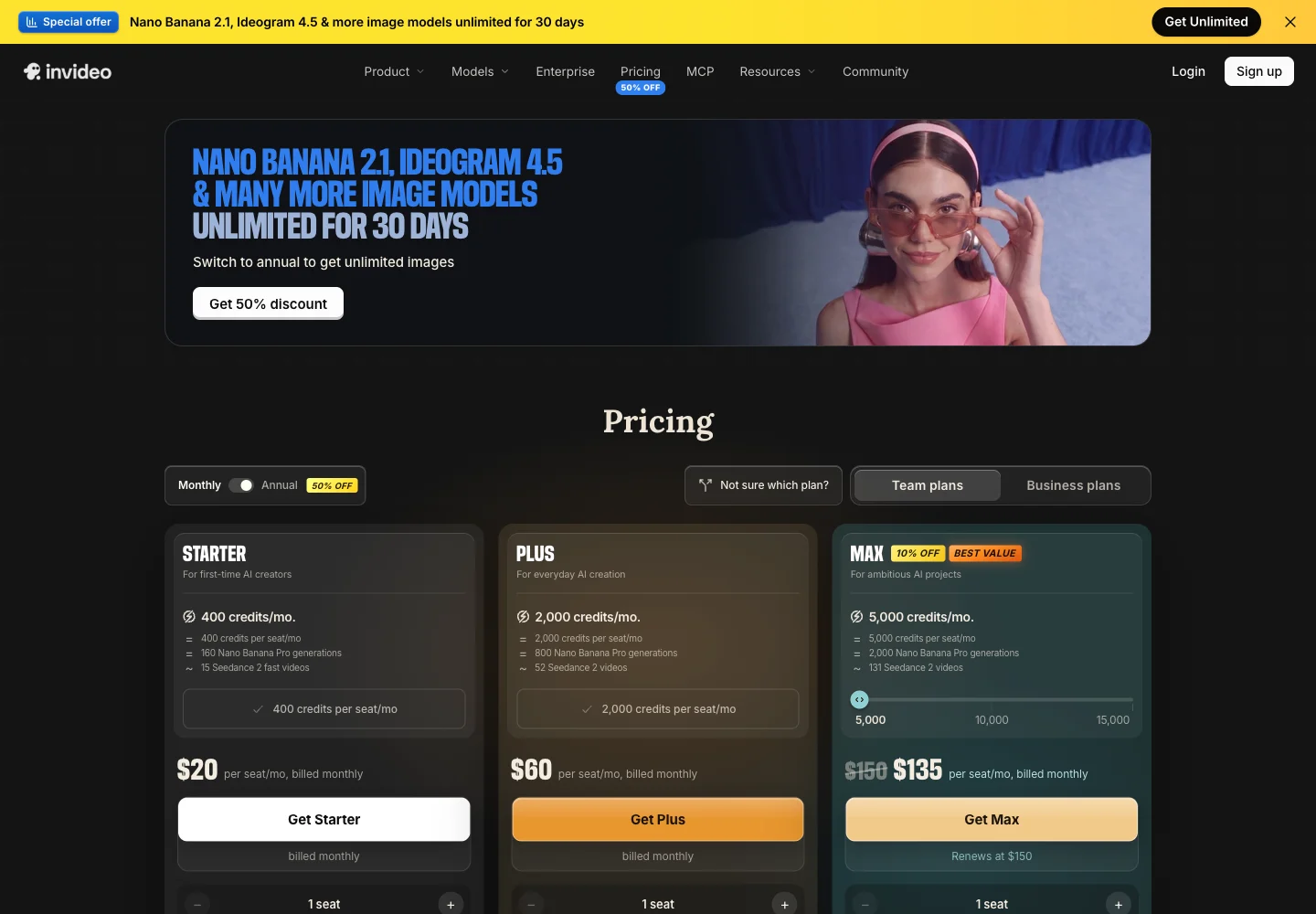
The live InVideo pricing interface reviewed for this guide showed Starter, Plus, and Max with a monthly-versus-annual switch. With monthly selected, Starter was $20 per seat, Plus $60, and Max showed a $135 introductory price renewing at $150 for the selected 5,000-credit allowance. The table records both the offer and renewal basis rather than treating a temporary price as the permanent subscription.
The reviewed plan cards showed 400 monthly credits per paid Starter seat, 2,000 on Plus, and 5,000 for the selected Max bundle. Model and agent access also differed by plan. An older review’s minutes, stock quotas, or previous plan names may not describe the selection available to a new account today.
Estimate the complete AI work in a representative job: footage review, generated material, voice, music, and revisions where those operations are charged. Manual editing and an agent request are different usage categories in the official guidance. Compare the quoted workflow you need with the output you can actually approve.
| InVideo plan | USD / paid seat / month | Selected monthly credits / seat |
|---|---|---|
| Starter | $20 | 400 |
| Plus | $60 | 2,000 |
| Max | $135 introductory; renews at $150 | 5,000 selected bundle |
Monthly billing and Team plans were selected in the live interface. Max’s displayed introductory discount is distinguished from its renewal price. Different bundles, business terms, annual offers, and guest-seat allowances require separate review.
| Plan | Monthly price | Credits / month | Parallel generations |
|---|---|---|---|
| Starter | $29 | 800 | 1 |
| Pro | $59 | 2,400 | 2 |
| Scale | $119 | 5,600 | 3 |
274 credits for an illustrative 15-second draft
- Three 5-second Standard video clips
- 3 × 80
- Three large generated images
- 3 × 10
- Short script + short voiceover
- 2 + 2
- Illustrative draft total
- 274 credits
Standard video here means Seedance 2.0 at 720p without video references. Other models, text lengths, references, processing steps, and revisions can change the quote. This is a defined makespots example, not an equivalent-output cost benchmark against InVideo.
The trial provides 160 credits for 7 days, less than this full example. Review the workspace quote and choose a smaller first test if needed.
Official sources:InVideo pricingInVideo plans and credits
A 15-second reveal and a footage-led edit make a useful pair of tests
For the reveal test, provide a clean product image, one approved claim, and a vertical format. In makespots, select the preview that best fits the creative direction. In InVideo, choose the current creation path appropriate to the same brief. Keep a record of what each process needed in addition to the shared product materials.
For the editing test, supply a small collection of actual footage and a clear edit instruction. Ask for a short piece with a specified opening, one product moment, and a final action. Review clip selection, continuity, caption accuracy, audio transitions, and whether generated material is introduced only where intended.
Revise one specific part after the first approval pass. Count all attempts and hands-on corrections, not just the final exported clip. The result will show whether format discovery or editing assistance resolves your team’s present bottleneck. It will not establish that the same creative will win in an advertising account.
Use these five approved clips to make a 30-second vertical product edit. Open on the bottle being placed in the bag. Preserve the approved voiceover exactly. Use the real demonstration clip for the product interaction, add readable captions, and finish with the supplied end card. Ask before introducing a new generated shot.
Choose the workflow that handles the recurring job well
Try makespots if your recurring work is finding and adapting new product-ad formats. A small team can begin with visible examples, understand the required inputs, and keep the references and creative direction together in the project. That is a focused job distinct from assembling many minutes of supplied footage.
Keep InVideo on your shortlist if source-footage editing, a broader timeline environment, collaborative access, or its AI-agent workflow is a requirement. Test those requirements with real material. A polished reveal in another tool does not establish that a long editing workflow, agent connection, or multiplayer process has been replaced.
When the jobs overlap, use an explicit handoff. Export approved product shots from the tool that made them and bring them into the editing process with the relevant brief. Keep source assets and final exports clearly named so the team can revise the correct version later.
Preserve the source footage and editorial decisions
There is no documented direct InVideo project importer in makespots. Keep original footage, source audio, scripts, captions, approved graphics, and final exports. Final video alone does not preserve every timeline decision or the instructions used to produce generated material.
Rebuild one suitable product-ad brief in makespots before moving a larger editing process. Identify anything that still depends on the original timeline, agent, collaborator permissions, stock license, or source-file organization. Confirm that any reused third-party asset is licensed for the new use.
For team migration, list the actual roles and the jobs performed by each person. Moving a creator’s output is different from recreating the access and review process around that output. Keep the current workflow available until the replacement covers the production requirements you have verified.
- Save source footage, audio, captions, and approved final exports.
- Identify agent, timeline, stock-license, and collaboration dependencies.
- Rebuild a representative product brief and one revision.
- Review active creator seats, guest access, and credit needs before scaling.
Before you choose a InVideo alternative
What is a good InVideo alternative for product ads?
makespots is worth trying when your job begins with choosing a visual product-ad format. If you mainly edit existing footage or rely on a collaborative timeline and agents, evaluate those requirements separately before switching.
Is InVideo still just a text-to-video tool?
Its current public product presents an agentic video editor with a timeline, footage workflows, AI agents, and collaboration. This guide compares that current presentation rather than treating it only as a prompt-to-video generator.
Does every edit in InVideo consume credits?
Its official help distinguishes manual timeline editing from AI work. Agent processing and generation can use credits. Review the quote and usage for the actual operation instead of assuming that a short video implies a small total cost.
How much were the reviewed InVideo monthly plans?
With monthly billing selected, Starter showed $20 per paid seat and Plus $60. The selected Max bundle showed an introductory $135, renewing at $150, for 5,000 monthly credits per seat. Confirm the current account selection before purchasing.
Can I import an InVideo timeline directly into makespots?
There is no documented direct project importer. Preserve source clips, audio, scripts, captions, and approved exports, then rebuild a suitable brief in makespots. Check any stock or third-party asset licenses before reuse.
Should an agency replace its editing tool with makespots?
Only after verifying the actual jobs and collaboration requirements it needs to move. A useful product-ad workflow can complement an editor. It does not automatically replace all timeline, team-access, or agent-based production capabilities.
What this comparison is based on
Official product pages, documentation, and selected public billing states were reviewed on . makespots descriptions reflect the implemented product and published collection. Each image caption distinguishes a public competitor page from our own product interface.
The worked briefs and choice recommendations are original editorial analysis. We have not run a controlled cross-platform generation or advertising-performance benchmark. Screenshots document product presentation, while pricing snapshots need to be checked against the current account offer.
- InVideo editorFootage-led, agent-assisted editing and video production.
- InVideo pricingSeat pricing, plan credits, and current billing selection.
- InVideo plans and creditsAI work versus manual editing, usage, and plan rules.
- InVideo documentationTimeline editing, agent connections, and cost inspection.
Brand names and logos belong to their respective owners and are used to identify the products compared. Publication by makespots does not imply affiliation or endorsement.