Choose a topic and an AI presenter. AI finds episode ideas and drafts the spoken script and post caption. Edit the words, make your video, then start the next episode with the same familiar face.
No script needed. Series setup is free. Review credit costs before generating.
An example series
Everyday Kitchen
Your recurring presenter
Meet June.
A practical home cook. A familiar kitchen. A fresh idea in every episode.
Character reference
Scene & voice direction
Your series brief
What changes each time
01
Keep your herbs useful
Freeze small portions for your next meal.
02
A better pan sauce
Use what is left in the pan after cooking.
03
Prep one ingredient ahead
Make a weeknight dinner easier to start.
Illustrative episode plan.
One saved direction, several distinct episodes. You decide what is ready to publish.
The idea behind a series
Set the direction once. Give every episode a new point.
A one-off avatar clip starts with a person and a script. A series also gives you a recurring subject, a recognizable presentation and a place to keep the next episode. You can return to the saved character and settings instead of describing the whole production again.
Character
Your presenter’s reference portrait, appearance, language and voice direction. Reuse the reference while reviewing how it carries into each generated shot.
Series
The recurring idea, audience and video settings. A kitchen tips series and a product explainer can share a character while keeping their own direction.
Episode
A specific topic, an approved spoken script, generated shots and the finished MP4. Make the next episode about a new question while keeping the series familiar.
From topic to finished episode
A clear next step, all the way through.
Start with a topic and a character. AI can choose the first episode topic and write the script and post caption together. Review the words before video generation, then check the performance and edit the assembled result.
01
Set up the series
Describe the recurring topic, choose a saved character or a starting point, then confirm the language and video settings. A specific first-episode topic is optional: the saved brief can guide the first script.
Content → Character → Confirm
02
Shape the script
Ask for a script from the series brief, choose a suggested idea or bring your own words. Edit the spoken lines and review how they are divided into shots. Approve the script before producing video.
A clear topic and words you have reviewed
03
Generate and watch
Review the generation quote. The default episode run produces the missing shot images and talking clips, then assembles the episode. Watch with sound; individual shot adjustments remain available when needed.
Reuse selected media; regenerate a specific shot when necessary
04
Edit, download and return
Open the timeline to adjust the selected clips and caption phrases. Review the final MP4, download it and publish it yourself. Add another topic to the same series when you are ready for the next episode.
One place for the series and its episodes
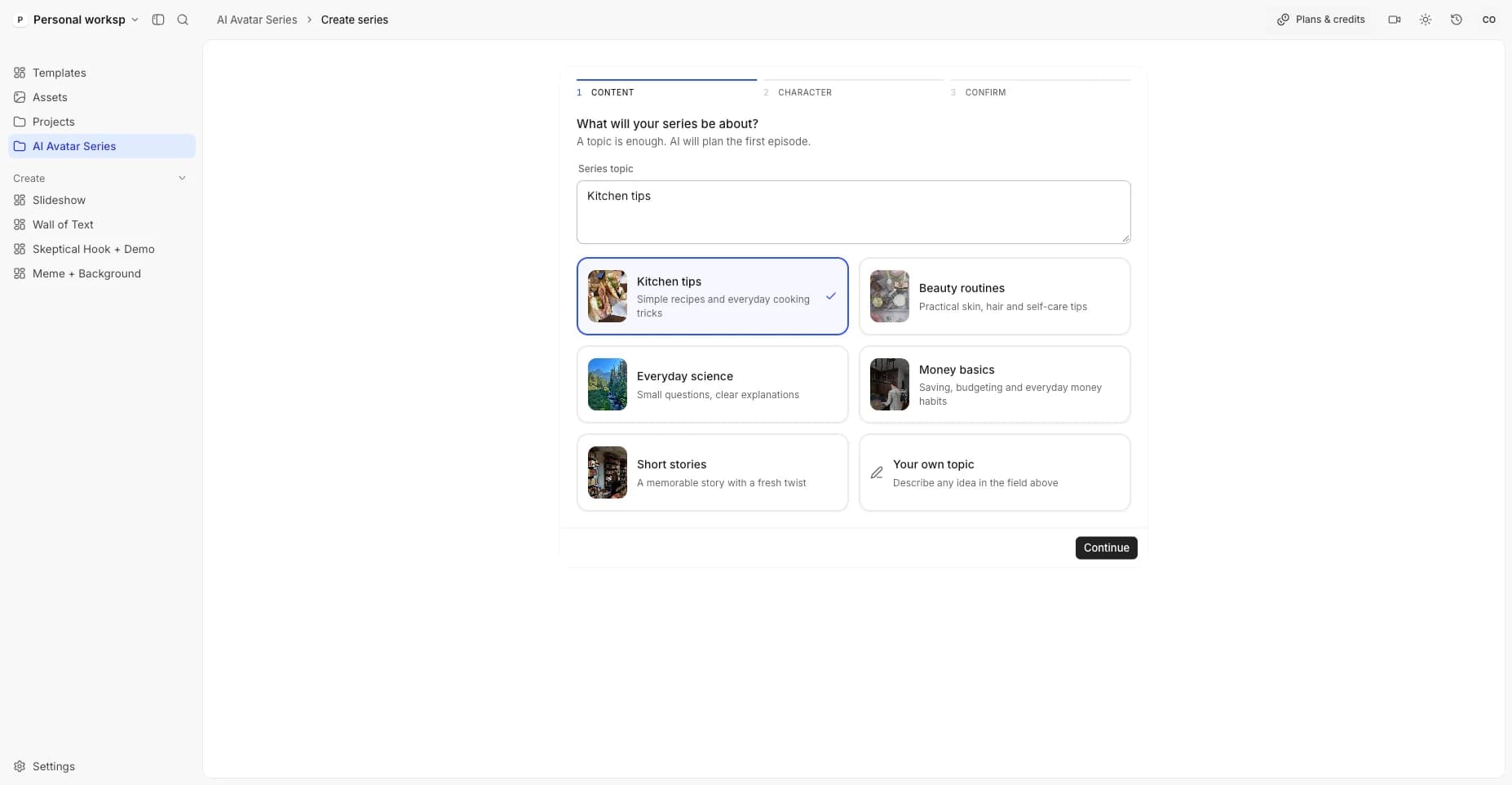
makespots / Create a series
Actual interface
Start with a topic. Choose a character, then review the settings before creating the series. Follow the complete workflow
Recognizable, with room for a new idea
Keep the reference. Direct the details.
Character references help carry a face and appearance across the series. Consistency still needs your eye: a changed camera angle, a busy hand action or a new setting can change the result. Keep the important details stable and review every shot with sound.
Keep these steady
The selected character portrait and defining appearance
Wardrobe, scene and camera direction where continuity matters
Language, voice direction and the level of explanation
A recurring format your audience can follow
Give each episode its own reason to exist
Change the question, demonstration or product detail. One host can explain storing herbs today and a simple pan technique next time. That is a reusable series direction; repeating the same finished script is just another version of one video.
Voice direction is reused, but the voice is not locked to a single voice identity. Listen for changes in accent, pace and tone before keeping a clip.
A series brief is a direction, not a whole script.
Describe who you are speaking to, the recurring subject and the kind of episode you want. Keep details that matter across the series in the brief. Save the exact words for the episode’s script, where you can review and edit them.
Original brief example
Everyday Kitchen
Make a series of practical kitchen tips for people who cook after work. June is a warm, matter-of-fact home cook in a bright kitchen. Each episode explains one small technique with an ordinary ingredient. Start with a recognizable problem, explain what to do, and end with one useful takeaway. Keep the language conversational and avoid health claims.
Choose one practical problem. Explain the preparation and show a simple action. Review the spoken words, generate the episode, then check the visual details before downloading.
01A clear topic for this episode
02A script you have reviewed
03A finished video you have watched
Pick a format with a second episode
A host, an audience and a repeatable subject.
The best starting point is narrow enough to guide an episode and broad enough to support another. Give the presenter one kind of useful job, then plan a few genuinely different topics before you build out a channel.
Practical explainers
Teach one useful thing
A patient presenter explains one everyday question at a time. Keep the audience and level steady while the question changes.
01Why does a pan brown food?
02What does resting a dough change?
03Why do some ingredients separate?
Tips & demonstrations
Build a recognizable routine
Give a recurring host a narrow subject and a clear setting. Plan one action the viewer can follow, rather than several unrelated tips.
01Store one ingredient well
02Show one tool in use
03Fix one common prep mistake
Presenter-led creative
Introduce your next product
Reuse the presenter and visual direction across product introductions. Check the actual product, wording and every on-screen interaction.
A narrator over scene visuals and an on-camera avatar serve different creative ideas. AutoShorts focuses on recurring faceless creation and scheduled publishing. makespots’s Avatar Series focuses on a recurring presenter, script review and an editable, downloadable episode.
Faceless series (AutoShorts style)
AI avatar series (makespots)
Who is on screen
Stock footage, AI images and a narrator voice
One recurring AI character, talking to camera
What viewers recognize
The topic and the editing style
A familiar face and look, with saved voice direction
What you set once
Niche, voice and visual style
Series topic, character and suggested video settings
Each episode
Script, visuals and voiceover
AI topic, editable script, talking video and post caption
Review the words. Watch the performance. Keep the work.
The script and generated performance need different kinds of review. Fix the message before generating more clips. Once video is ready, check the face, props, mouth movement, voice and caption phrases together, then make final timeline edits.
Review before you spend more
The workspace shows a quote before generation. Producing an episode can include a character portrait, script work, shot images, talking clips and assembly. What is missing, your duration and the selected quality affect the quote.
Existing selected shots can be reused. Regenerating a successful shot to try another direction is a new generation. Manual timeline edits and downloading an existing result do not ask the model to make the video again.
Keep the series as the home for its episodes. Open a finished episode to download the video and copy its post caption. Start the next episode from a suggested idea or let AI choose a topic using the saved series direction.
Publish the downloaded MP4 with the tools you normally use. Posting rhythm helps you plan the work; it does not schedule or automatically upload videos to a social account.
Bring a clearer brief to the first run, spot continuity problems sooner and give the next episode a useful starting point. These guides include complete examples and the checks behind each decision.
These public accounts informed our research into recognizable presenters and repeated formats. Use them to study the idea, pacing and variation between episodes; their videos are independently created.
Real-account references from public social posts, not makespots customer results or generated outputs. Each name links to the original source. Hua & Jin is shown in the linked research walkthrough.
Before your first episode
The details that make starting easier.
What is an AI avatar series?
An AI avatar series is a set of short videos built around a recurring presenter and subject. The series saves its brief and video settings, while a character supplies the reference portrait and appearance and voice direction. Each episode has its own topic, script, shots and finished video.
What do I need to start?
Start with a recurring topic and choose a character. A saved character or a starting preset can make that easier. You can also describe an original character or bring a portrait you have the right to use. Names, detailed audience notes and a queue of finished episode ideas are optional.
Can I use my own script?
Yes. Bring the spoken script for an episode or develop one from the series brief. Review the words and shot breakdown before video generation. Supplied spoken words are preserved through the script planning flow, so check the full script before approving it.
Does the character stay exactly the same?
The selected character portrait is reused as a visual reference, together with the saved appearance and scene direction. Generated details can still change between shots. Review the face, hair, wardrobe, props and mouth movement, and adjust or regenerate clips that do not fit the character.
Is the voice identical in every shot?
The clips use the same saved voice direction, but the voice is not locked to a single voice ID. Accent, pitch and pace can vary. Listen to the whole episode with sound before keeping the result, especially after changing the language or generating another clip.
How do generation credits work?
Creating a series setup is free. AI generation uses credits after you approve a quote. The default episode run can cover missing shot images, talking clips and assembly together. Your quote depends on duration, quality, required media and what you already have. A free trial is not a promise that a complete episode is free.
Can I edit an episode after generation?
Yes. Open the finished episode in the timeline to work with the selected clips, audio and caption phrases. Manual editing does not ask AI to regenerate the footage. Making a new AI performance or replacing a successful clip with a newly generated one is a separate generation.
Does makespots schedule or publish my videos?
Finished episodes can be downloaded as MP4 files. Publish them using your usual TikTok, Instagram or YouTube workflow. A planned posting rhythm helps organize the series; it does not connect social accounts, schedule an upload or automatically publish a video.
Which formats and lengths can I choose?
Series settings offer vertical 9:16, horizontal 16:9 and square 1:1, with a configurable episode duration. The assembled export is currently 720 × 1280, 1280 × 720 or 720 × 720 respectively. Review the selected duration, quality and exact generation quote in your workspace.
What should I check before publishing?
Watch every shot with sound. Check the character, lip movement, pronunciation, objects and caption phrases. Verify factual claims and any product shown. Make sure the downloaded file plays correctly and follow the destination platform’s rules for synthetic content and disclosure.
Need a different creative format?
Your template library is still here.
Explore product reveals, social video and image formats when the idea needs a different starting point. Templates, assets and projects work alongside your Avatar Series.